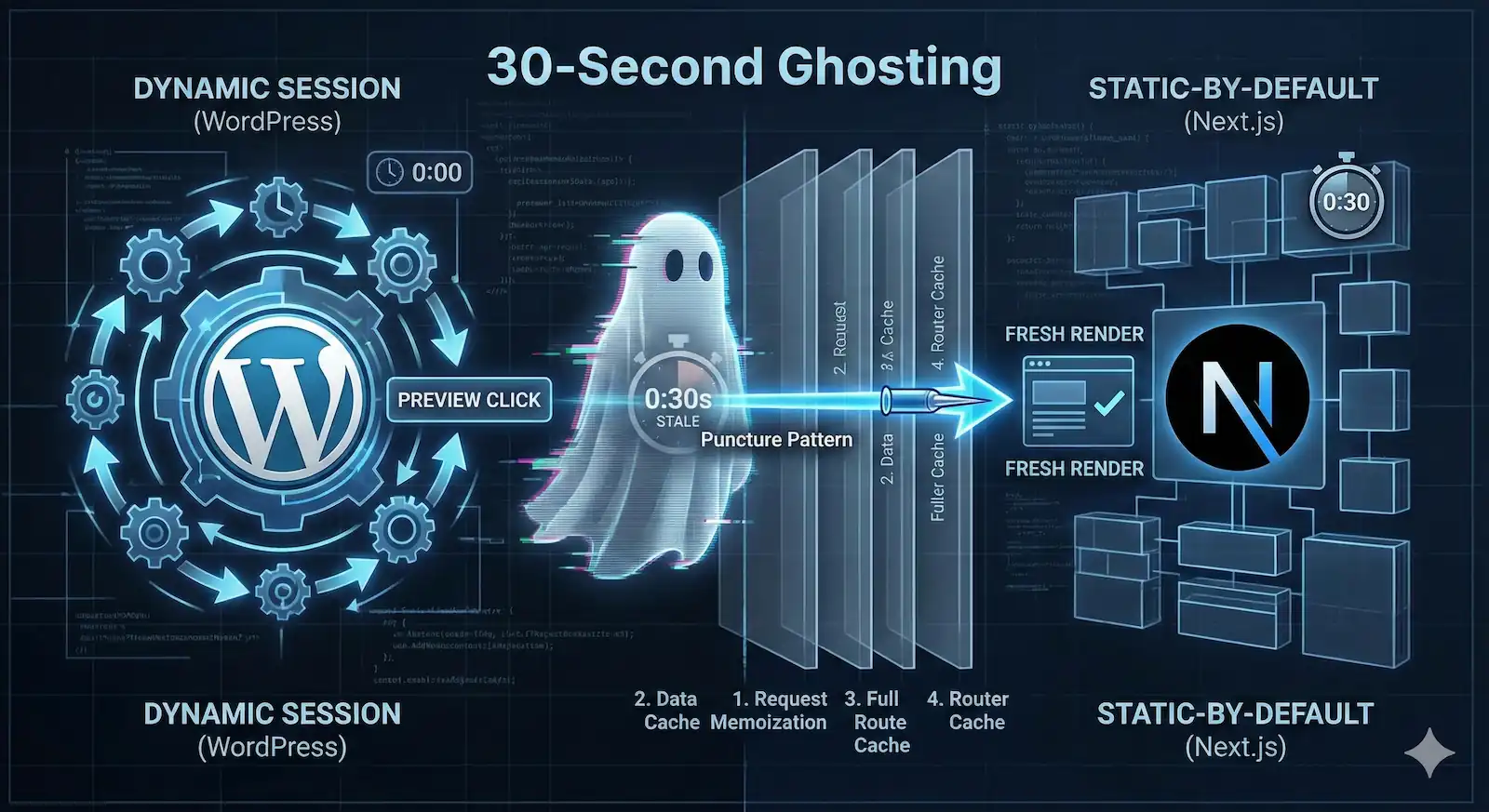
An editor saves a post in WordPress and clicks “Preview.” The page loads instantly, but the content remains stale. They refresh. Still stale. They assume the save failed, re-edit, and save again—only to find that exactly thirty seconds later, the update finally appears.
This is the “30-Second Ghosting” effect. It is a psychological friction point that makes content editors feel gaslit by their own tools. In an enterprise headless deployment, this isn’t just a bug; it is a breach of trust between the engineering team and the editorial staff.
Next.js WordPress Preview Failure is an architectural mismatch where the Next.js App Router’s static-first caching (Data Cache and Client Router Cache) overrides the dynamic requirements of a WordPress draft session. This results in “ghosting,” where editors see stale content for 30–300 seconds because the framework fails to puncture its internal cache layers even when Draft Mode is enabled.
The Architectural Collision: Why Next.js Defaults Break WordPress
The failure is a deterministic consequence of two opposing architectural philosophies clashing at the network, server, and client layers:
- WordPress operates on a Dynamic-by-Session model. Every request is authenticated via cookies, guaranteeing a fresh view of data.
- Next.js (App Router) is Static-by-Default. It aggressively prioritizes immutable, cached states at every layer of the render cycle to optimize performance.
When an editor clicks “Preview,” they trigger an exceptional dynamic state. While Next.js provides the draftMode() utility to handle this, the framework’s defaults often fail to propagate this signal to the underlying data-fetching and client-side routing layers. To successfully render a preview, the application must execute a “Puncture Pattern”—a systematic invalidation across the entire stack.
The Failure Matrix: Four Layers of Resistance
Forensic analysis of stale preview sessions reveals that failures occur because developers fail to pierce one or more of these four distinct caching layers.
| Cache Layer | Location | The Mechanism | The Lie (The Failure) |
|---|---|---|---|
| 1. Request Memoization | Server | React cache() | “I already fetched this exact data earlier in this specific render pass.” (Low impact). |
| 2. Data Cache | Server | Persistent Storage | “The Blindness.” draftMode() is active, but the internal fetch logic is pulling stale JSON because it wasn’t told to bypass the cache. |
| 3. Full Route Cache | Server | HTML/RSC Payload | “The Persistence.” The server serves the pre-rendered HTML snapshot from build time because the route wasn’t explicitly marked as dynamic. |
| 4. Router Cache | Client | In-Memory (Browser) | “The 30-Second Ghost.” The browser ignores the server entirely for 30s (default dynamic staleTime) on soft navigations. |
The “Puncture Pattern” Thesis
A “working” preview isn’t a single setting; it’s a coordinated attack on these four layers. If you leave even one layer intact, the editor sees stale content.
The forensic reality is that standard headless implementations fail because they treat draftMode() as a “magic bullet” rather than what it actually is: a passive signal that requires manual propagation.
Enabling draftMode() fixes all caching.
Reality: It only changes the cookie context; you must still manually opt-out of the Data Cache.
Failure Point 1: The Data Cache & “Draft Mode” Blindness
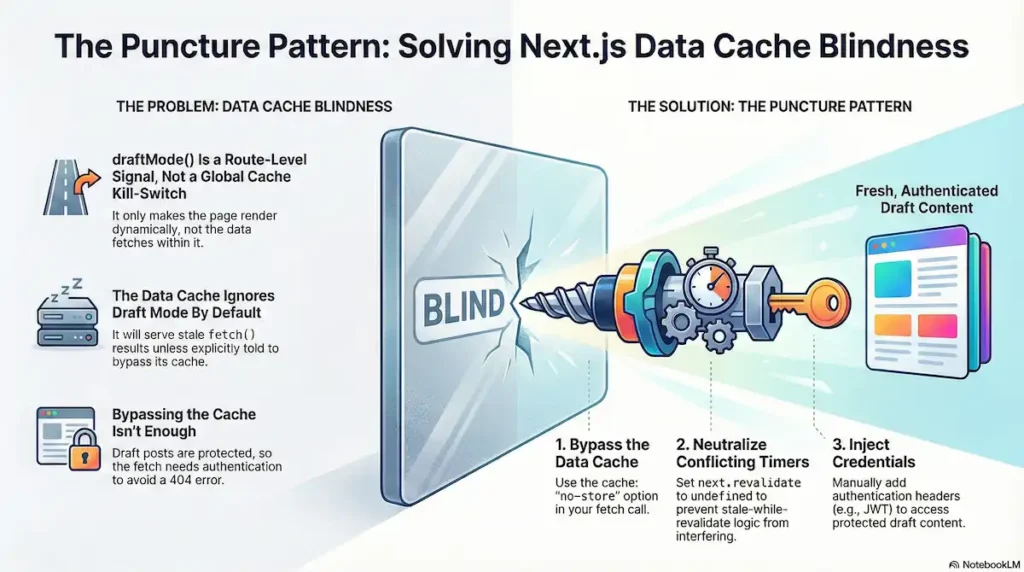
The first layer of resistance in the Puncture Pattern is the Next.js Data Cache. For many engineers, this is where the “Ghosting” phenomenon begins: a state where the WordPress backend confirms a post is in “Draft,” the __prerender_bypass cookie is present, yet the application continues to serve stale, published content.
This is a deterministic failure caused by the “Draft Mode Blindness” inherent in the framework’s fetch heuristics.
The Limit of draftMode()
A pervasive misconception exists that draftMode().enable() acts as a global kill-switch for caching. In reality, draftMode() is a Route-Level Signal. It tells the Full Route Cache to skip the static HTML snapshot and execute the server component dynamically.
However, the Data Cache—the layer responsible for persisting fetch() results—is not automatically synchronized with this state. The server-side fetch remains an isolated event. Unless the developer manually links the isEnabled state to the fetch request, the framework will happily serve a cached JSON artifact from the file system while the route itself is supposedly “dynamic.”
Forensic Evidence: The Blind Primitives
Field reports and GitHub discussions (e.g., #51302, #60445) confirm that Next.js prioritizes cache persistence over session dynamism unless the “Puncture” is explicit:
- The Revalidate Conflict: If a fetch includes a
next.revalidatetimer, the framework may prioritize Stale-While-Revalidate logic over cache-bypass directives. - Primitive Blindness: Newer data-fetching primitives like
unstable_cache(Next.js 14) anduse cache(Next.js 15) do not currently inherit thedraftModestate. They require a manual cache-key or an explicit bypass.
The Puncture Pattern: Implementing the Needle
To pierce the Data Cache, you must treat the fetch as a Credentialed Request. Because WordPress drafts are protected resources, a “clean” fetch without authentication will return a 404, even if the cache is bypassed.
The Technical Logic
- Directive Escalation: Use
cache: 'no-store'to ensure the Data Cache is bypassed entirely. - Heuristic Neutralization: Set
next.revalidatetoundefined. This prevents conflicting revalidation timers from overriding theno-storeinstruction. - The Credential Injection: Manually inject the necessary headers (e.g., Application Passwords or JWT).
Remediation Snippet: Server-Side Puncture
This pattern ensures the Data Cache is neutralized and the WordPress Origin is reached with the proper authority.
import { draftMode } from 'next/headers';

async function getWordPressPost(slug) {
  const { isEnabled } = draftMode();

  // THE CREDENTIAL INJECTION: Adjust based on your auth stack
  // (e.g., Application Passwords, JWT, or Session Cookies)
  const headers = {
    'Content-Type': 'application/json',
    'Authorization': `Basic ${Buffer.from(`${process.env.WP_USER}:${process.env.WP_APP_PASSWORD}`).toString('base64')}`
  };

  const response = await fetch(
    `${process.env.WORDPRESS_API_URL}/wp-json/wp/v2/posts?slug=${slug}&status=${isEnabled ? 'any' : 'publish'}`,
    {
      method: 'GET',
      headers: isEnabled ? headers : { 'Content-Type': 'application/json' },
      // Force origin fetch and ignore Data Cache if draftMode is active
      cache: isEnabled ? 'no-store' : 'force-cache',
      next: {
        // Neutralize heuristics: undefined prevents SWR overrides
        revalidate: isEnabled ? undefined : 3600,
        tags: ['posts', slug]
      }
    }
  );

  if (!response.ok) {
     throw new Error(`[Puncture Failure] Origin responded with ${response.status}`);
  }

  return response.json();
}
By explicitly tying the fetch configuration to the draftMode state and injecting credentials, you transform the Data Cache from a silent adversary into a controlled layer.
Failure Point 2: The Isolation Wall & Credential Apathy
The second layer of the Puncture Pattern addresses the Isolation Wall. In a headless architecture, the transition from an incoming request to an outgoing server-side fetch is not a transparent relay; it is a hard boundary where authentication context evaporates.
The “401 Unauthorized Loop” is a frequent forensic finding where the editor’s browser possesses valid WordPress cookies, yet the Next.js application returns a “Post Not Found” or a login prompt. This occurs because Next.js Server Components exhibit Credential Apathy: they do not automatically forward the user’s “Identity” (cookies/headers) to downstream API calls.
The Isolation Wall
When Next.js performs a NextResponse.rewrite() in Middleware to handle a preview URL, the browser’s connection remains intact. However, the code executing inside the resulting Server Component is Credential-Isolated.
The Forensic Chain of Failure:
- The Entry: Browser hits
/api/previewwithwordpress_logged_in_*cookies. - The Rewrite: Middleware redirects internally to
/preview/[id]. The cookies stay in the browser header, but the server-side environment does not “inherit” them for outgoing network calls. - The Blind Fetch: The Server Component calls
fetch(WP_API). Because this is a new request originating from the server, it is an “anonymous stranger” to WordPress. - The Rejection: WordPress receives a request for a “Draft” from an unauthenticated source. It returns a
401or404.
The Puncture Pattern: Direct Session Forwarding
To resolve the 401 Loop without re-engineering your entire auth stack (e.g., switching to Application Passwords or JWT), you must implement Manual Credential Propagation. This involves “stapling” the editor’s active session directly to the server’s outgoing fetch request.
The Forensic Trade-off
Forwarding session cookies is a Surgical Pattern, not a general-purpose architecture. It is the most direct way to fix a broken preview, but it carries a “Forensic Debt”:
- Fragility: WordPress cookie names are derived from a hash of the site URL. If the site URL changes, your extraction logic must adapt.
- Scope: This pattern only works for the active session of the editor triggering the preview.
Remediation: The Forward-Chained Fetch
The following pattern ensures the “Chain of Trust” is manually maintained. We include the User-Agent to prevent modern Web Application Firewalls (WAFs) from flagging the server-side fetch as a bot.
import { cookies, headers } from 'next/headers';

async function getPreviewDataForensic(id) {
  const cookieStore = cookies();
  const allHeaders = headers();

  // 1. Extract WordPress Auth Cookies
  // WP cookie names follow the pattern: wordpress_logged_in_[hash]
  const wpCookies = cookieStore.getAll()
    .filter(c => c.name.startsWith('wordpress_logged_in_'))
    .map(c => `${c.name}=${c.value}`)
    .join('; ');

  // 2. The Forward-Chained Fetch
  const res = await fetch(`${process.env.WORDPRESS_API_URL}/wp-json/wp/v2/posts/${id}?status=any`, {
    headers: {
      // Manual Propagation: Carrying the editor's passport
      'Cookie': wpCookies,
      // WAF Bypass: Masking the server-side fetch as the editor's browser
      'User-Agent': allHeaders.get('user-agent') || 'NextJS-Forensic-Proxy',
    },
    cache: 'no-store' // Critical: Layer 2 Puncture
  });

  if (res.status === 401) {
    throw new Error("Puncture Failure: WordPress Origin rejected the session cookies.");
  }

  return res.json();
}
By treating the Middleware as a sanitization layer that must be manually bypassed, you ensure the chain of trust remains intact from the editor’s browser to the WordPress origin.
Failure Point 3: Defeating the “30-Second Ghosting” Client Cache
For many engineers, Failure Point 3 is the most insanity-inducing stage of the Puncture Pattern. You have successfully bypassed the Data Cache (Failure 1) and ensured your WP_AUTH cookies are traversing the Middleware Sanitization Wall (Failure 2). You verify the server logs: the WordPress API is returning the fresh draft, and the Next.js Server Component is rendering the correct RSC payload.
Yet, on the editor’s screen, the past persists. This is the Temporal Mirage—a state where the browser is stubbornly hallucinating a previous version of the page despite the server holding the truth. This “ghosting” occurs because of a specific, often-undocumented in-memory persistence layer: the Next.js Router Cache.
The Memory Over Reality Conflict
Unlike the Data Cache, which lives on the server, the Router Cache is a client-side, in-memory cache that stores rendered RSC (React Server Component) payloads in the browser’s RAM. Its purpose is to make navigation feel instantaneous.
Next.js implements a rigid heuristic for this cache that can only be described as a “Preview Killer”:
- Static Segments: Cached for 5 minutes.
- Dynamic Segments: Cached for ~30 seconds.
In a headless WordPress environment, your preview route is dynamic. When an editor hits “Update” in WordPress and triggers a preview window, the Next.js client-side router performs a Soft Navigation. If the browser has a version of that route in memory that is less than 30 seconds old, it renders immediately from memory, often without issuing a new RSC fetch to your server. It doesn’t matter how fresh your server data is if the browser refuses to check.
Why Standard Refreshes Fail
A forensic observation often reported by developers is that “refreshing” the preview doesn’t always clear this state. Because the Router Cache is tied to the current browser session’s memory, if an editor triggers a preview via a postMessage or an iframe reload (common in Gutenberg), the client-side router may intercept the request and replay the old state. This creates a massive friction point for editorial workflows where real-time feedback is non-negotiable.
The Puncture Pattern: Evaporating the Mirage
To ensure the editor sees reality, you must collapse the browser’s “staleness window.” You cannot rely on server-side cache: 'no-store' alone—you must force the client to acknowledge the server’s update.
Cache-Control: no-store kills the 30-second ghosting.
Reality: The Router Cache is internal to the browser memory and ignores HTTP headers.
The Declarative Puncture (staleTimes)
Prior to the 14.x era, there was no documented way to disable this behavior globally. However, in recent versions of Next.js, you can use the experimental.staleTimes configuration. This is the primary declarative puncture for senior architects.
By setting the dynamic stale time to zero, you collapse the staleness window, forcing the client to revalidate and fetch a fresh RSC payload on every navigation event.
Remediation: Configuring next.config.js
/** @type {import('next').NextConfig} */
const nextConfig = {
  experimental: {
    // Neutralizing the Client Router Cache
    staleTimes: {
      dynamic: 0, // Force origin fetch for Previews
    },
  },
};
module.exports = nextConfig;
The Imperative Puncture (router.refresh())
If you are operating on a legacy version of the App Router, or if you need to guarantee cache invalidation on a specific “Preview” view, you must use the Imperative Puncture.
Using router.refresh() specifically tells the Next.js router to invalidate its internal cache for the current route and fetch fresh data from the server. Crucially, it does this without losing client-side state (like scroll position).
Implementation Pattern:
'use client';
import { useRouter } from 'next/navigation';
import { useEffect } from 'react';

export default function PreviewPuncture({ children }) {
  const router = useRouter();

  useEffect(() => {
    // The Imperative Puncture
    // Forces the Client Router to drop the ghosted state on mount
    router.refresh();
  }, [router]);

  return <>{children}</>;
}
The “Nuclear” Option: Timestamp Busting
In enterprise environments where aggressive edge-proxying or unusual browser behavior persists, you must resort to the URL-based Puncture. By appending a unique timestamp (?v=${Date.now()}) to the preview URL in WordPress, you force the browser to treat the request as a brand-new route. This bypasses every layer of the cache stack—Data Cache, Full Route Cache, and Router Cache—simultaneously.
By implementing these fixes, the Temporal Mirage evaporates. The Next.js client finally reflects the reality of the server, and the “30-Second Ghost” is put to rest.
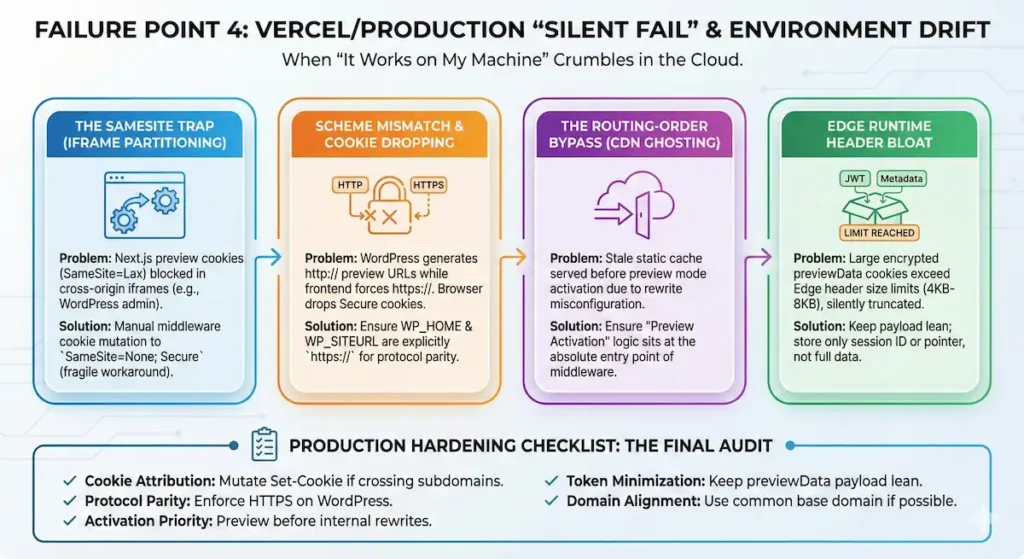
Failure Point 4: The Vercel/Production “Silent Fail” (SameSite & Environment Drift)
The final layer of the Puncture Pattern addresses Environmental Camouflage. This is the stage where the “it works on my machine” defense crumbles. You have verified the code, the fetch logic, and the manual propagation in local development, yet the production deployment remains broken.
In this scenario, the infrastructure itself—hardened by production-only security protocols—hides the preview data behind a wall of cross-site restrictions and edge runtime constraints. For the senior architect, these failures are a result of Environment Drift: the delta between the permissive nature of localhost and the “Secure-by-Default” posture of a production Edge Network.
The SameSite Trap (Iframe Partitioning)
The most notorious forensic finding in production is the SameSite cookie attribute conflict. By default, the Next.js __prerender_bypass and __next_preview_data cookies are issued with a SameSite=Lax attribute.
When your WordPress admin (e.g., cms.example.com) attempts to load the Next.js preview (e.g., web.example.com) within an iframe—the default behavior for the Gutenberg editor—the browser identifies this as a cross-site request. Under Lax rules, the browser withholding these cookies from the iframe entirely. The frontend never sees the bypass signal, assumes a standard visitor is arriving, and serves the public-facing static cache.
The Forensic Reality: Next.js does not provide a native configuration to change these internal cookie attributes in the App Router. To puncture this, developers often resort to Middleware Header Mutation—manually intercepting the Set-Cookie header to append ; SameSite=None; Secure. It is a fragile, undocumented workaround, but often the only way to maintain a session across partitioned domains.
Scheme Mismatch & Silent Cookie Dropping
In production, security expectations are enforced by the browser, not just the server. A Scheme Mismatch occurs when WordPress generates preview URLs using http:// while the Next.js frontend is forced to https://.
If your preview cookies are marked as Secure (as they should be in production), the browser will silently drop them if the initial handshake or the iframe source is perceived as insecure. The Edge Network isn’t “rejecting” the headers; the browser is refusing to even send them. This is often masked by Vercel’s TLS termination, making the failure invisible in server-side logs.
The Routing-Order Bypass (CDN Ghosting)
While Vercel’s CDN is designed to bypass the cache when preview cookies are present, a “Silent Fail” occurs if your Routing Order is misconfigured.
If your next.config.js or Middleware performs a rewrite to a statically generated route before the preview mode is fully established, the Edge may serve a cached, public response from the Full Route Cache before the application has a chance to see the bypass cookie. This isn’t a CDN “leak”; it is a Race Condition in the Request Lifecycle. You must ensure that the “Preview Activation” logic sits at the absolute entry point of your middleware or route handlers.
Edge Runtime Header Bloat
Unlike local Node.js environments, Edge runtimes have strict, implicit limits on the size of the header block. Forensic analysis reveals that developers who attempt to store large JWTs or excessive metadata within the encrypted previewData object often approach these limits.
Once the total cookie header size approaches typical browser or edge buffers (often 4KB to 8KB), the runtime may silently truncate or drop the header entirely. This leads to a total failure of the preview mechanism without an explicit error log, leaving the engineer to wonder why the draftMode() signal simply “vanished” in transit.
Production Hardening Checklist: The Final Audit
To ensure your preview environment survives the transition from localhost to the Edge, apply the following hardening steps:
- Cookie Attribution: If using iframed previews across different subdomains, verify if you need to mutate the
Set-Cookieheader toSameSite=None; Secure. - Protocol Parity: Ensure WordPress
WP_HOMEandWP_SITEURLare explicitly set tohttps://to prevent browser-level cookie rejection. - Activation Priority: Confirm that preview mode activation occurs before any complex internal rewrites that might point to statically cached paths.
- Token Minimization: Keep the
previewDatapayload lean. Store only a session ID or a pointer; do not embed large WordPress user objects or full JWTs in the cookie. - Domain Alignment: Whenever possible, use a common base domain (e.g.,
cms.brand.comandwww.brand.com) to allow forSameSite=Laxcompatibility and reduce cross-origin friction.
Remediation: The Unified Puncture Pattern
Successful resolution of Next.js WordPress preview failures requires more than a series of disconnected patches; it demands a synchronized remediation strategy. Because Next.js acts as an Active Caching Adversary, fixing only one layer while leaving others intact ensures a break in the Chain of Trust. For example, bypassing the server-side Data Cache is futile if the 30-second Client Router Cache continues to serve a “Temporal Mirage” to the editor.
To achieve architectural alignment, engineers must execute the Unified Puncture Pattern, piercing all four layers of resistance simultaneously.
The Forensic Checklist for Stack Hardening
To move from forensic analysis to operational stability, your implementation must satisfy these four critical puncture points:
- Puncture 1: The Data Layer (Server-Side Fetch): Transition from default fetch behavior to explicit cache control. You must link
draftMode().isEnableddirectly to the fetch init object, settingcache: 'no-store'and—crucially—ensuringrevalidateis set toundefined. This prevents the framework’s internal heuristics from overriding your “fresh data” directive with stale background timers. - Puncture 2: The Auth Layer (Secure Propagation): Abandon “Header Hope.” Instead of assuming cookies will traverse the edge runtime, implement Manual Propagation. Encapsulate a short-lived session identifier or an opaque preview token within the encrypted
previewDataobject to ensure authentication survives the Isolation Wall without exceeding header size limits. - Puncture 3: The Client Layer (Router Invalidation): Eliminate the “30-Second Ghosting” effect by implementing
staleTimes: { dynamic: 0 }in yournext.config.js(for Next.js 14.2+). For legacy versions, use the imperativerouter.refresh()on mount to force the client-side router to drop its in-memory hallucination of the past and acknowledge the server’s reality. - Puncture 4: The Production Layer (Environment Hardening): Resolve the “Local vs. Production” drift by hardening your session cookies. Set
SameSite=None; Securespecifically for cross-domain or iframed preview contexts (like the Gutenberg editor) and audit your Edge Runtime for header parity to prevent silent cookie dropping.
Maintaining the Chain of Trust
The transition from a “Passive Renderer” to an “Active Caching Adversary” model changes how we maintain headless stacks. In a production environment, operational hardening is not a one-time event but a continuous requirement. As Next.js evolves—moving from unstable_cache toward the use cache directive—the surface area for caching collisions will only expand.
The future of Headless WordPress relies on this forensic rigor. By viewing every layer of the Next.js stack as a potential barrier to real-time data, senior architects can build resilient systems that honor the dynamic intent of the CMS while leveraging the performance of the modern web.
Edge Case Q&A
revalidatePath and revalidateTag are Server-Side Data Cache instructions. They purge the file system/memory on the server. However, they have zero authority over the Client-Side Router Cache. The browser has no mechanism to “listen” for a server-side purge event. If the editor’s browser has cached the RSC payload in its local RAM, it will continue to render that payload until the staleTime expires (30s) or a hard refresh occurs. Purging the server does not purge the client’s memory.
The Failure: If your
__prerender_bypass cookie is not explicitly set to SameSite=None; Secure, the browser will drop it during the iframe request.The Diagnostic: Open DevTools inside the iframe context. You will likely see the cookie present in the “Application” tab but missing from the “Network” request headers for the document fetch.
unstable_noStore() (or const dynamic = 'force-dynamic ) only marks the Full Route Cache as dynamic. It ensures the server renders the page on every request. It does not automatically pass credentials to your fetch calls, nor does it override the Data Cache if your fetch has a revalidate property set elsewhere in the tree. You are fixing Layer 3 (Route) while leaving Layer 2 (Data) and Layer 4 (Client) intact. fetch, you are bloating the outgoing request header.The Fix: Your Middleware must perform Header Sanitization. Do not forward the entire
Cookie string. Extract only the wordpress_logged_in_* and wp_post_preview tokens. use cache directive is even more aggressive than the current Data Cache. Currently, the “Puncture Pattern” relies on fetch overrides. With use cache , you must ensure that your cache keys are Identity-Aware. If you don’t include a session ID in the cache key, the first editor to preview a post will “poison” the cache for everyone else, serving their specific draft version to all subsequent “authorized” previewers.