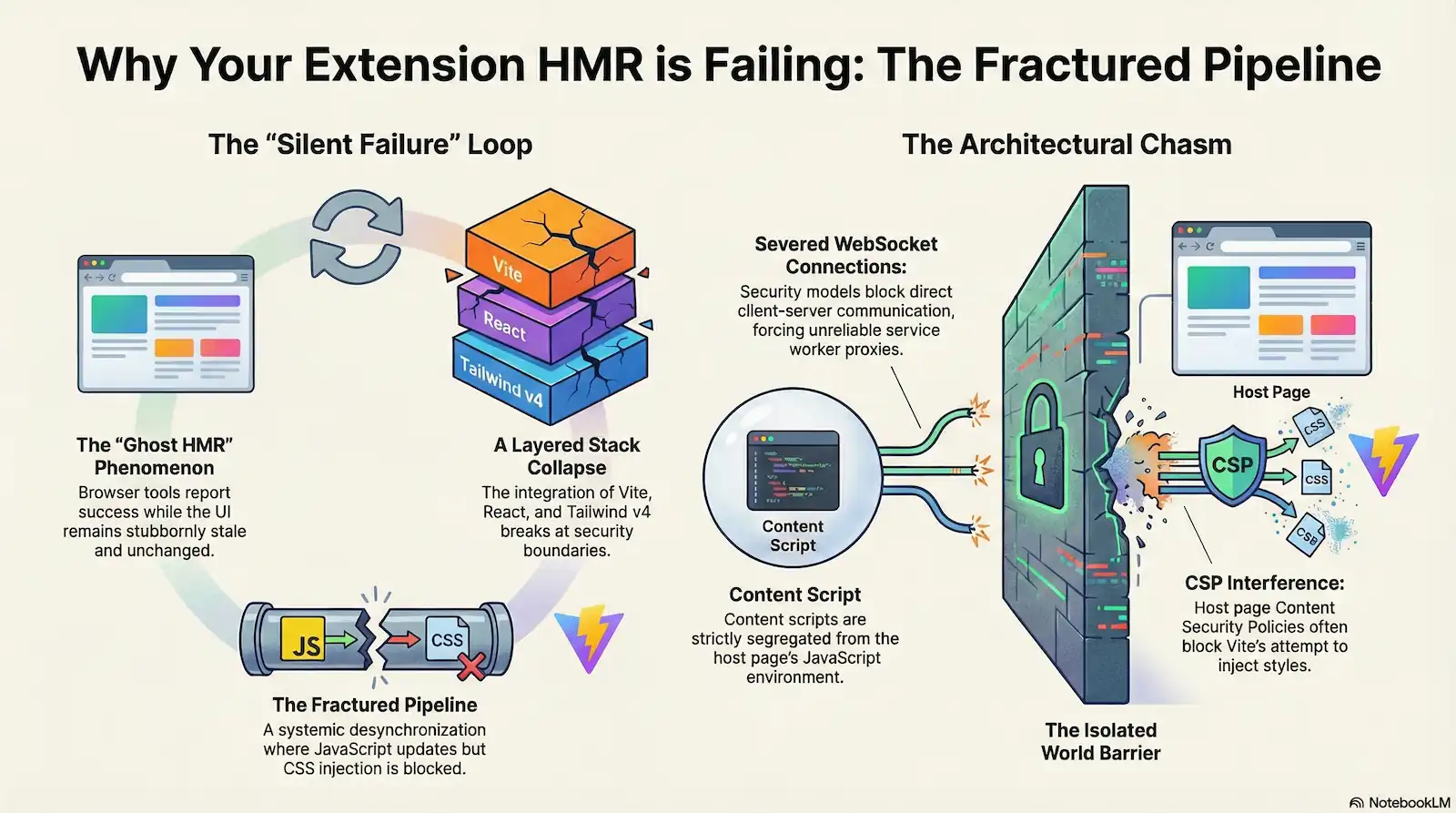
You change a Tailwind class in your React JSX—perhaps swapping a bg-slate-900 for a bg-blue-600. You save the file, Vite reports a successful hot update, and your browser re-renders the component. You see the class name update in the Elements panel, but the visual state remains stubbornly unchanged. You check the console for errors, but it is silent. This is the “Silent Failure” loop, a hallmark of modern browser extension development where the tools report victory while the UI remains stale.
This experience isn’t just a minor bug; it is a Layered Collapse of the modern frontend stack. When you integrate Vite, the @crxjs/vite-plugin (v2 beta), React, and Tailwind CSS v4, you are attempting to run a high-speed relay race across a fractured pipeline. In this metaphor, Hot Module Replacement (HMR) is the baton, but that baton is routinely dropped at the “Isolated World” handoff—the boundary where the browser’s security model separates your extension code from the host page.
Fixing this requires more than a simple config change. It demands a multi-layered configuration matrix. We will dismantle each failure point, applying targeted technical overrides—from WSS protocol forcing to the programmatic “Vite Touch” synchronization—to bridge the architectural chasm and bring reliability back to the extension development experience.
The HMR Autopsy: Why Extensions Break Vite’s Logic
The phenomenon developers colloquially call “Ghost HMR” is not a glitch in your code; it is a fundamental architectural conflict between Vite’s design assumptions and the security constraints of modern browser environments. In a standard Single Page Application (SPA), Vite maintains a direct, low-latency WebSocket connection between the @vite/client runtime and the local Node.js server. This “Unified Light DOM” model assumes the client and server exist in a shared, unrestricted network context where modules can be swapped atomically.
Browser extensions shatter this assumption.
Vite HMR failure in browser extensions occurs because the standard direct WebSocket connection is severed by the “Isolated World” security model and forced through a Manifest V3 background service worker proxy. This creates a systemic desynchronization where the JavaScript logic (JSX) updates successfully while the CSS asset injection is blocked or invalidated.
The Isolated World and the Proxy Chasm
The primary site of the “Fractured Pipeline” is the Isolated World. Content Scripts exist in a paradoxical state: they share the DOM with the host page but operate in a strictly segregated JavaScript environment subject to the host page’s Content Security Policy (CSP). When Vite attempts to push a style update, the @vite/client logic often hits a wall; the host page’s CSP may block the connection entirely, or the browser’s security model may prevent the script from injecting new <style> tags or fetching external assets.
Furthermore, Manifest V3 (MV3) introduces a “Proxy Chasm.” Because Content Scripts cannot consistently maintain a direct external connection, HMR signals must be routed through a transient Background Service Worker. This worker acts as a strict proxy between the development server and the Content Script. If this proxy hangs—or if the Service Worker enters a dormant state—the HMR signal is lost in transit.
The CRXJS Structural Transition
The systemic breakdown is exacerbated by the architectural evolution of the build tools themselves. In the transition to the CRXJS v2 beta, the plugin moved from a filesystem-based update model to a high-speed WebSocket-based HMR. While this increased performance in simple environments, it introduced a critical synchronization vulnerability.
We identify the “Diagnostic Symptom” as a partial update sequence: you modify a Tailwind class, the JSX re-renders (successfully updating the class name in the DOM), but the corresponding Tailwind CSS rules are absent from the injected stylesheets. The “engine” (the JSX update) has moved forward, but the “tracks” (the JIT-compiled CSS) were never laid.
The Four Failure Domains
Through our forensic analysis, we have categorized this “Layered Collapse” into four distinct Failure Domains:
- Transport Layer: Blocked WebSocket signals due to Origin Mismatch or CSP.
- Isolation Layer: Style leakage or injection failure caused by Shadow DOM encapsulation.
- Synchronization Layer: A race condition where the module update finishes before the Tailwind JIT compiler flushes the CSS buffer.
- Invalidation Layer: The failure of the CRXJS virtual module graph to invalidate stale CSS chunks after a JIT error.
Understanding these layers is the only path to restoration. Without addressing each domain, the developer remains trapped in a loop where the console reports success, but the UI remains frozen in time.
Domain Blocks: Solving Origin Mismatch & WSS Failures
The most jarring symptom of a fractured HMR pipeline is its inconsistency across tabs. You might notice that your extension updates perfectly when testing on a local http://localhost:3000 dashboard, but the moment you switch to a live production site like https://google.com, the HMR payloads fail silently. This is not a random bug; it is a calculated refusal by the browser’s security checkpoints.
The Anatomy of a Transport Failure
When your content script attempts to open a WebSocket connection to the Vite dev server from a secure host page, it triggers two primary defensive mechanisms:
- The Mixed Content Algorithm: Modern browsers strictly enforce a “no security downgrade” policy. Attempting to initiate an insecure
ws://request from a securehttps://context is viewed as a critical vulnerability. The browser inherently distrusts the unencrypted stream, often killing the connection before the first frame is sent. - Content Security Policy (CSP) Restrictions: Many high-security host pages use a
connect-srcdirective that explicitly defines which origins a script can communicate with. Ifws://localhostor your specific dev server IP isn’t whitelisted in the host page’s header, the browser parser blocks the connection immediately.
To bypass these checkpoints and restore the high-speed rail connection of your HMR, you must choose between two primary network topologies.
Topology A: The Hardened TLS/WSS Route
This is the “Gold Standard” for DevOps architects. It involves creating a local environment that mirrors production security standards using WebSockets over SSL (WSS).
To implement this, you must first use a tool like mkcert to generate locally trusted TLS certificates. This allows your local Vite server to present a valid certificate that the browser will accept even from a secure origin. In your vite.config.ts, you cannot rely on Vite’s default internal handles; you must manually point to your certificate files.
Your configuration requires using fs.readFileSync to pull in your localhost-key.pem and localhost.pem files into the server.https object. Crucially, you must explicitly set the HMR client configuration to use protocol: 'wss' to ensure the @vite/client runtime attempts a secure handshake.
Topology B: The Chromium “Localhost” Bypass
If managing local certificates is too heavy for your workflow, you can exploit a specific exception in the Chromium security model. Chromium permits CORS and Mixed Content downgrades specifically for the string literal localhost.
However, the browser is pedantic: it views 127.0.0.1 as a network IP subject to standard restrictions, whereas localhost is treated as a “special name” that bypasses certain secure-context checks. By forcing your vite.config.ts to use host: "localhost" and protocol: "ws", you can trick specific versions of the browser into allowing the insecure connection even on an https:// page.
| Feature | Topology A (WSS/TLS) | Topology B (Localhost Bypass) |
|---|---|---|
| Security Level | High (Production Mirror) | Low (Dev Shortcut) |
| Setup Overhead | mkcert installation required | Config change only |
| Protocol | wss:// | ws:// |
| Reliability | Works on all Chromium/Firefox versions | Version-dependent; breaks on 127.0.0.1 |
| CORS/CSP | Requires mkcert trust | Relies on “special name” exception |
For most senior engineers, Topology A is the preferred path to eliminate “flaky” HMR. By aligning your development transport layer with the browser’s security expectations, you ensure that the HMR baton is never dropped due to a protocol mismatch.
The ?inline Detachment: Styling the Shadow DOM Boundary
In standard Single Page Applications, Vite’s @vite/client runtime relies on a native updateStyle function that automatically appends <style> tags to the document.head. In the context of browser extensions, however, this mechanism hits a structural dead end. Extension developers frequently encapsulate their UI within a Shadow Root to prevent host page styles from leaking in and extension styles from leaking out. This creates an impenetrable boundary; styles residing in the document.head cannot penetrate the Shadow Root, leaving your UI completely unstyled.
The ?inline Trade-off and HMR Disconnect
To circumvent this, developers often turn to the ?inline query suffix (e.g., import styles from './style.css?inline'). This forces Vite to return the CSS as a raw string rather than an active module that injects itself into the DOM. While this allows for manual injection into the Shadow Root, it introduces a “Ghost HMR” failure.
The ?inline query severs the automated CSS HMR dependency tracking. Vite begins to treat the CSS as a static string asset rather than a dynamic module. Consequently, when you modify your .css file, the Vite server detects the change, but the update signal never triggers a re-render of the specific component using that string. The manual injection logic remains static, holding onto the initial version of the styles while the source code moves forward.
Implementation: Restoring the Feedback Loop
To restore HMR without forcing a full page reload, you must transition from simple string injection to the CSSStyleSheet API and Constructable Stylesheets. This allows you to treat the stylesheet as an object that can be updated in place.
Restoring the “Fractured Pipeline” requires a Manual HMR Trap. You must explicitly define an HMR boundary using import.meta.hot.accept() to catch the update signal and manually refresh the stylesheet object.
How to Implement a Manual Style Trap:
- Import as Inline: Fetch the CSS string using the
?inlinesuffix. - Initialize the Sheet: Create a
new CSSStyleSheet()and usereplaceSync(styles)to load the initial CSS. - Adopt the Sheet: Add the sheet to the
shadowRoot.adoptedStyleSheetsarray. - Trap the Update: Use
import.meta.hot.acceptto listen for changes to the CSS module and callreplaceSyncwith the new content.
// style-handler.ts
import cssText from './styles.css?inline';

const sheet = new CSSStyleSheet();
sheet.replaceSync(cssText);

export const shadowStyles = sheet;

// The Manual HMR Trap
if (import.meta.hot) {
  import.meta.hot.accept('./styles.css?inline', (newModule) => {
    if (newModule) {
      // Manually push the new CSS into the existing sheet
      sheet.replaceSync(newModule.default);
      console.log('[HMR] Shadow DOM styles updated');
    }
  });
}
By implementing this pattern, you bridge the “Fractured Pipeline.” Instead of waiting for a broken automated system to penetrate the Shadow Boundary, you manually catch the updated “baton” at the gate and push it through to the internal environment. This ensures that Tailwind v4 utility changes reflect in your Shadow DOM UI in real-time, bypassing the limitations of the standard Vite injection logic.
Synchronizing the Race: Fixing CRXJS v2 Stale State
The Race Condition: Why HMR Fires Before CSS Exists
Even with a secure WSS connection and correct Shadow DOM injection, you will likely encounter the “Ghost Class” phenomenon: you add bg-emerald-500 to a React component, the browser’s Elements panel shows the class is active on the div, but the background remains white. You are witnessing a race condition where the engine has outrun the tracks.
In a standard Vite-powered SPA, the module graph is relatively flat. However, forensic evidence from CRXJS Issue #849 reveals that the v2 beta (versions 2.0.0-beta.15 to .21) structurally ignores the "css" array in your manifest.json during development. Instead of the extension runtime managing these styles, CRXJS attempts to treat them as standard HMR modules. This leads to a critical synchronization failure between the JSX watcher and the Tailwind JIT engine.
The Anatomy of the Stale State
The failure occurs because Vite and Tailwind operate on two different schedules. When you save a JSX file, a high-speed chain of events is triggered:
- Event 1: Vite’s filesystem watcher (chokidar) detects the JSX change and immediately initiates an HMR payload dispatch.
- Event 2: The browser receives the JSX update and re-renders the React component.
- Event 3: The DOM now reflects the new class name (e.g.,
class="bg-blue-500"). - Event 4: The Tailwind JIT compiler—often running as a separate PostCSS process—finishes generating the actual CSS rule for
.bg-blue-500. - Event 5: The updated CSS file is written to the
/distor internal cache.
Because Event 5 (the CSS write) occurs after Event 1 (the HMR dispatch), the browser is left with a Ghost Class: a valid DOM attribute with no corresponding rule in the injected stylesheet.
The Forensic Resolution: The “Vite Touch” Plugin
To bridge this “Fractured Pipeline,” we must programmatically force Vite to acknowledge the late-arriving CSS. The solution is a custom Vite Touch Plugin. By leveraging the POSIX fs.utimesSync() method, we can manually update the “modified time” (mtime) of your global CSS entry point exactly when a JSX file changes.
This synthetic timestamp modification tricks Vite’s chokidar watcher into thinking a new CSS change has occurred, triggering a secondary, delayed HMR update that captures the finalized Tailwind JIT output.
Implementation Checklist:
- Identify the Target: Locate your global CSS entry point (e.g.,
./src/assets/tailwind.css). - Hook the HMR: Use the
handleHotUpdatehook in Vite to intercept JSX/TSX changes. - Update mtime: Apply
fs.utimesSyncto the CSS file to force a re-scan. - Sequence the Payload: Ensure the “touch” happens slightly after the initial change to allow the JIT compiler to finish its write.
// vite.config.ts - The "Vite Touch" Implementation
import { Plugin } from 'vite';
import fs from 'fs';
import path from 'path';

function touchGlobalCss(): Plugin {
  return {
    name: 'touch-global-css',
    handleHotUpdate({ file, server }) {
      // Only trigger when a component file changes
      if (file.endsWith('.tsx') || file.endsWith('.jsx')) {
        const cssPath = path.resolve(__dirname, './src/index.css');

        // Update the access and modification times to "now"
        const now = new Date();
        fs.utimesSync(cssPath, now, now);

        // Log for forensic verification
        server.config.logger.info(`[Vite-Touch] Synchronizing Tailwind JIT for: ${file}`, {
          timestamp: true
        });
      }
    },
  };
}
By implementing this manual synchronization layer, you ensure that the “tracks” are always ready for the “engine.” This prevents the systemic desynchronization that plagues CRXJS v2 and restores the sub-100ms feedback loop required for professional frontend development.
Tailwind v4 Oxide Engine: Breaking the Cache Lock
The Oxide Engine: When Performance Becomes a Bottleneck
The speed of Tailwind v4 is its greatest asset, but in the chaotic environment of a Chrome Extension build, that performance comes at the cost of recovery. When the Oxide engine hits a syntax snag, it doesn’t just fail; it “locks”—protecting its high-speed cache by refusing to update until the entire process is killed.
With the release of version 4, Tailwind transitioned from a JavaScript-reliant architecture to the Oxide engine, a high-performance Rust-based core. This shift was designed for extreme speed and near-instant AST Parsing (Abstract Syntax Tree), but it introduced a new “Frozen Valve” in the Invalidation Layer. In the specific context of a browser extension pipeline—where multiple layers of proxies and content scripts already strain Vite’s watcher—this rigidity becomes a developer productivity killer.
The Cache Lock Phenomenon
The failure occurs most frequently during the definition of design tokens. If you introduce a malformed CSS rule or a typo in a @theme variable, the Oxide engine attempts to parse the AST and fails. Under normal circumstances, correcting the typo should trigger an HMR update. However, forensic evidence suggests that the Oxide engine can “lock” the malformed state into the Vite module graph.
You are then trapped in a Systemic Desynchronization: the Vite filesystem watcher detects your fix and reports a successful update in the terminal, but the Oxide compiler’s internal state remains “stuck” on the previous error-free build. Your browser remains unchanged, and your new utility classes simply refuse to generate. This is the “Full Restart” Trap—the point where developers feel forced to kill the Vite server and restart the entire build process just to clear a stale internal cache, destroying the sub-100ms feedback loop.
Breaking the Lock: Force Invalidation
To bypass this “Frozen Valve” without a full server restart, you must manually trigger a re-parse of the entire CSS entry point. Because the Oxide engine relies on high-speed caching of the source file, you need to change the file’s content in a way that forces a fresh AST walk.
The most efficient forensic fix is the Synthetic Version Comment. By adding or updating a simple versioning string directly in your main CSS entry file (where the @tailwind directive resides), you force the compiler to invalidate its previous cache and re-evaluate the file from scratch.
Implementation of the “Comment-Version” Trick:
- Locate your entry file: Open the CSS file containing your
@themeor@tailwinddirectives. - Insert a synthetic version: Add a comment like
/* v=1.0.1 */at the top. - Trigger the re-parse: When the “Cache Lock” occurs, simply increment the number (e.g.,
/* v=1.0.2 */). - Verification: This change modifies the file hash, forcing the Oxide engine to abandon its stale internal state and perform a fresh AST parse without requiring a Vite restart.
By understanding that the bottleneck lies in the Invalidation Layer, you can stop fighting the server and start surgically clearing the “Frozen Valve” that halts your development flow.
The Unified Pipeline: A Hardened Vite Configuration
The Master Matrix: A Production-Ready vite.config.ts
We cannot wait for a stable v2 release of CRXJS to fix these systemic misalignments. Instead, we must wrap the existing tools in a protective configuration layer that forces the protocol, synchronizes the JIT race, and bypasses the security chasm. The solution is not a single “magic flag” but a Configuration Matrix that aligns the Vite development server, the CRXJS plugin, and the Tailwind Oxide engine into a single, hardened conduit.
This architecture treats the main CSS entry point as the “Heartbeat” of the entire HMR system. By forcing every JSX change to “pulse” through the CSS file, we ensure the Tailwind JIT compiler and the Vite module graph remain in a state of permanent synchronization.
The Hardened Configuration
The following vite.config.ts implements the Topology A transport fix and the Vite Touch synchronization logic. It requires mkcert to have been executed in your project root to generate the necessary localhost.pem and localhost-key.pem files.
import { defineConfig } from 'vite';
import react from '@vitejs/react-swc';
import { crx } from '@crxjs/vite-plugin';
import fs from 'fs';
import path from 'path';
import manifest from './manifest.json';

// Forensic Fix: The Tailwind HMR Sync Plugin
// This resolves the "Ghost Class" race condition by forcing a CSS re-parse
// whenever a React component is modified.
const tailwindHmrSync = () => ({
  name: 'tailwind-hmr-sync',
  handleHotUpdate({ file, server }) {
    if (file.endsWith('.tsx') || file.endsWith('.jsx')) {
      const cssPath = path.resolve(__dirname, 'src/assets/main.css');
      const now = new Date();
      // Update mtime to trick Chokidar into a secondary HMR sweep
      fs.utimesSync(cssPath, now, now);

      server.config.logger.info(`[Pipeline-Sync] Heartbeat sent to: ${path.basename(cssPath)}`, {
        timestamp: true,
      });
    }
  },
});

export default defineConfig({
  server: {
    // Topology A: Hardened TLS for WSS clearance
    https: {
      key: fs.readFileSync('./localhost-key.pem'),
      cert: fs.readFileSync('./localhost.pem'),
    },
    hmr: {
      host: 'localhost',
      protocol: 'wss', // Force secure WebSockets to bypass CSP
    },
  },
  plugins: [
    react(),
    crx({ manifest }),
    tailwindHmrSync(), // Weld the JSX engine to the CSS tracks
  ],
  resolve: {
    alias: {
      '@': path.resolve(__dirname, './src'),
    },
  },
});
The CRXJS Anchor and Manifest Strategy
While the vite.config.ts handles the transport and timing, the manifest.json must be structured to accommodate the CRXJS v2 beta’s known limitations. Forensic evidence from CRXJS Issue #849 confirms that the plugin may ignore the css array during development when using certain content script configurations.
To ensure your styles are actually injected without manual ?inline detachment (which severs HMR), your manifest should maintain a consistent entry point. We recommend a “Hybrid Injection” strategy: list your CSS in the manifest for production stability, but rely on the Constructable Stylesheets pattern or a direct import in your React main.tsx for development.
{
  "manifest_version": 3,
  "name": "Hardened Extension",
  "content_scripts": [
    {
      "js": ["src/content/index.tsx"],
      "matches": ["https://*/*"],
      "css": ["src/assets/main.css"]
    }
  ]
}
The Invalidation Strategy: The CSS Heartbeat
For this pipeline to remain hardened, you must designate a single CSS file (e.g., src/assets/main.css) as the Systemic Anchor. This file should contain your @tailwind directives and any @theme overrides.
By using the tailwindHmrSync plugin to “touch” this specific file, you trigger an Invalidation Layer sweep. This clears any potential Oxide cache locks caused by temporary syntax errors. Instead of the Oxide engine remaining “stuck” on a previous AST parse, the synthetic timestamp modification forces a fresh walk of the module graph, ensuring that the latest JIT-generated utility classes are always included in the HMR payload.
The Diagnostic Suite: Verifying Your <100ms Loop
A silent console is not a sign of success; it is often the hallmark of a “Zombie Pipeline” where the tools have given up on reporting errors. To achieve a true <100ms feedback loop, you must look past the UI and audit the underlying WebSocket traffic and filesystem telemetry.
The Forensic Audit: How to Prove Your HMR is Fixed
Verifying a hardened pipeline requires more than a visual check. You must perform a multi-point inspection of the transport, synchronization, and injection layers to ensure the “Pressure Gauge” remains in the green. Use this forensic checklist to validate your restoration:
- Inspect the WebSocket Handshake Open the Chrome Network Tab and filter by “WS”. You must see a connection to your Vite server with a
101 Switching Protocolsstatus. Click the connection and select the Frames sub-tab. A “Healthy Pipeline” will show atype: connectedmessage on load, followed by atype: updateframe immediately upon saving a file in your IDE. If the frames remain static despite your saves, the synchronization layer is still severed. - Verify CSP and WSS Clearance Navigate to a high-security external domain (e.g.,
https://google.comorhttps://github.com). Open the Console. If your WSS/mkcert tunnel is holding, the console will be clear of “Refused to connect to ws://localhost…” errors. Any such error indicates a failure in the transport layer, meaning the host page’s Content Security Policy is still blocking the HMR baton. - Perform an Mtime Telemetry Check To verify the “Vite Touch” fix, monitor the filesystem directly. Open your terminal and run
ls -l src/assets/main.css(or your specific entry point). Trigger a save in a.tsxor.jsxcomponent. The POSIX “modified time” (mtime) of the CSS file must update within milliseconds of the JSX save. This confirms the custom plugin is successfully tricking Vite into re-parsing the JIT-generated styles. - Conduct a Ghost Class Audit This is the ultimate test of the Invalidation Layer. Add a new, unique Tailwind class (e.g.,
mt-[71px]) to a component. Open the Elements panel and select the node. Verify that the class exists on the element, then look at the Styles pane. If the class is present in the HTML but the CSS rule is missing, your JIT-to-HMR race condition is still active. If the rule appears instantly, the tracks are being laid as fast as the engine moves.
The <100ms Metric: Success is defined as a sub-100ms visual change in the browser after a CTRL+S in your IDE. When your diagnostic suite confirms that the WebSocket frames are firing, the mtime is updating, and the Styles pane is populating without “Ghost Classes,” you have successfully welded the fractured pipeline into a single, high-performance conduit.
Final Verdict: Restoring the Developer Experience
This unified configuration transforms the “Fractured Pipeline” into a resilient, high-performance conduit. By forcing WSS for secure transport, implementing a Manual Sync for the Tailwind JIT race, and using a Synthetic Heartbeat to invalidate stale Oxide states, we restore the sub-100ms feedback loop. You no longer need to restart your Vite server or manually refresh your tabs; the tools finally align with the security and architectural realities of modern browser extension development.
Edge Cases Q&A
fs.utimesSync only modifies the timestamp. While this triggers a re-parse, it does not trigger a content-change event that would re-execute the handleHotUpdate hook on the CSS file itself, preventing an infinite loop. content_security_policy override for the extension’s specific origins, or use the crxjs “background page proxy” to tunnel signals through the extension’s own unrestricted context. wss certificates. The “Localhost Bypass” (Topology B) often fails in Firefox; Topology A (Hardened TLS) is the only reliable path for cross-browser forensic consistency. file.endsWith check to specific subdirectories (e.g., src/components/) to avoid touching the CSS Heartbeat for non-UI logic changes. tailwindHmrSync to touch every module file, which is architecturally noisy. Stick to Global CSS for extension UI.