Imagine a user fifteen minutes into a high-stakes financial transaction or a complex multi-step wizard. They haven’t closed their browser, and their internet connection is stable. Suddenly, the interface resets. Every temporary variable, every unsaved form field, and every authentication token vanishes instantly.
This is the “Black Swan” of Manifest V3 (MV3): a silent background update triggered by the Chrome Web Store. While the browser remains open, the Chrome process initiates a context teardown, deallocates the extension’s memory, and re-initializes the environment with a fresh, empty block for chrome.storage.session. To the user, it looks like a crash. To the developer, it is a catastrophic data loss event caused by a fundamental misunderstanding of the MV3 storage architecture.
The industry is currently witnessing a widespread case of architectural malpractice. Developers, migrating from the persistent background pages of MV2, often treat chrome.storage.session as a direct replacement for global variables. This is a dangerous assumption. In reality, chrome.storage.session is a “Phantom RAM Drive”—a volatile cache that is tied to the extension’s session lifecycle, not the user’s browser session.
Forensic analysis of the MV3 runtime reveals that this API is not a robust state container but a primary vector for race conditions and security vulnerabilities. It survives Service Worker termination, but it cannot survive extension re-initialization. Relying on it for critical application state without defensive wrappers is a recipe for production failure.
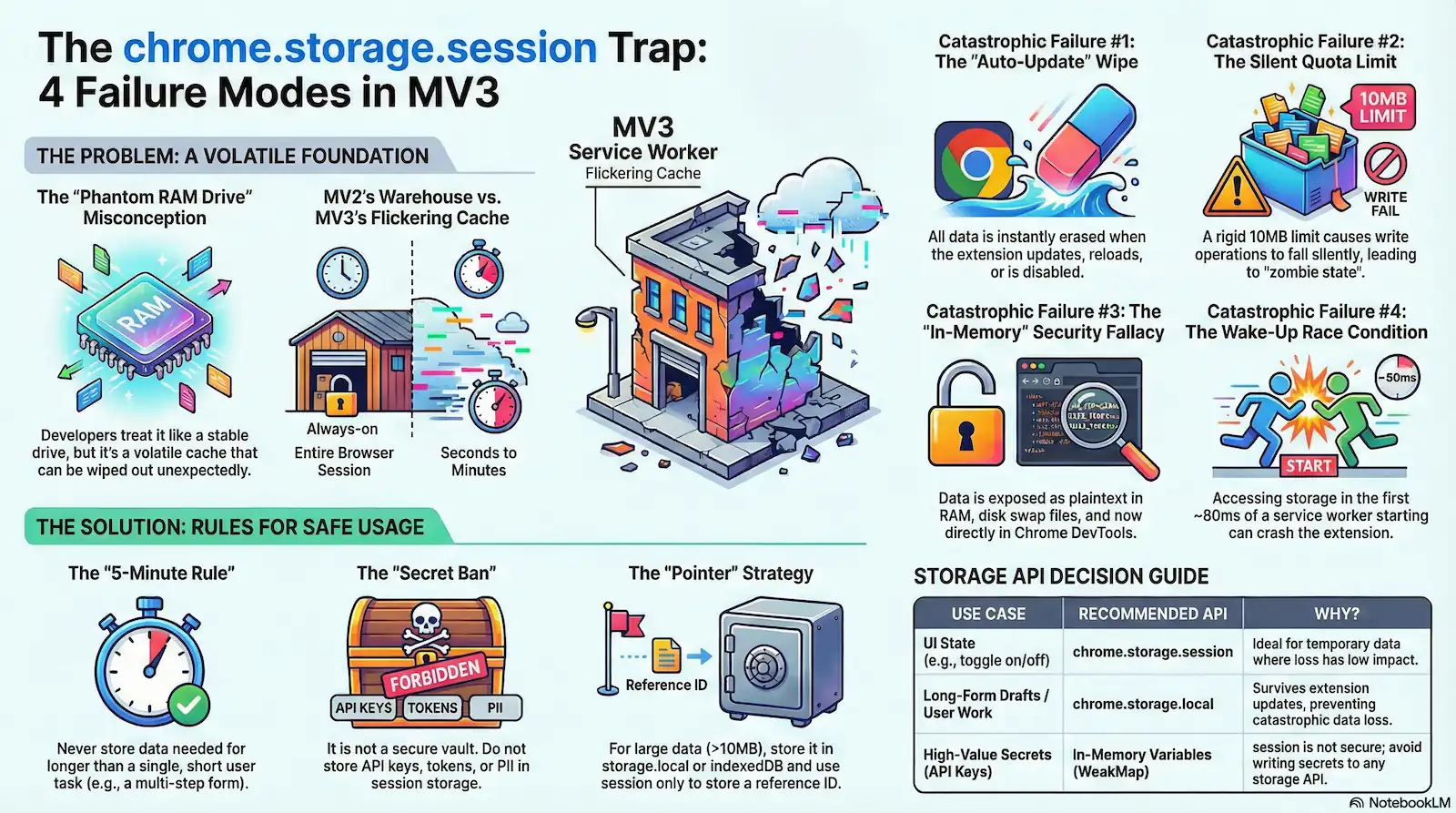
This technical dossier exposes four catastrophic failure domains inherent in the current implementation of chrome.storage.session:
- The “Auto-Update” Wipe: Total state erasure during background updates.
- The Quota Hard Limit: A rigid ceiling—now 10MB—that triggers silent write failures once exceeded.
- The “In-Memory” Security Fallacy: The myth of the “Secure Enclave” debunked by OS memory paging and DevTools exposure.
- Service Worker Wake-Up Races: The 80ms “cold boot” penalty where the storage API is accessed before it is even injected.
The Architectural Shift: Why MV2 State Logic Fails in MV3
To understand the instability of modern extensions, one must first look at the skeletal structure of Manifest V2. In the MV2 era, the background page was a Persistent Warehouse. It functioned as a long-running, hidden HTML document with a window object that remained alive for the entire duration of the browser session “. Developers could store complex state trees in simple global variables, confident that as long as the browser was open, the data was safe.
Manifest V3 (MV3) replaces this warehouse with a Flickering Cache. The Service Worker is the new engine, but unlike its predecessor, it is strictly event-driven. To conserve system resources, Chrome performs a Context Teardown whenever the extension is idle, terminating the worker and wiping the ServiceWorkerGlobalScope entirely “. In this environment, state is “Guilty until proven Persistent.” Any variable not explicitly offloaded to a storage API is essentially a ghost, destined to vanish during the next “start-stop” cycle.
Architectural Comparison: MV2 vs. MV3 State
| Feature | MV2 Background Page | MV3 Service Worker |
|---|---|---|
| Persistence | Always-on (Persistent) | Ephemeral (Event-driven) |
| Access Speed | Synchronous (Direct RAM access) | Asynchronous (IPC Latency) |
| Scope Lifespan | Browser Session Duration | Variable (Seconds to Minutes) |
| Global Object | window | ServiceWorkerGlobalScope |
chrome.storage.session was engineered to serve as a volatile buffer across these frequent terminations. The intent was to provide a memory-backed, asynchronous storage layer that survives a Service Worker’s sleep cycle. However, forensic analysis shows this API is strictly Context-Bound. While data persists through a standard worker idle termination, it is subject to a total wipe during an Extension Teardown—the specific moments when the extension’s execution context is destroyed due to an update, reload, or disable event. Relying on this API for persistent logic ignores the fact that its lifecycle is tied to the volatile extension instance, not the user’s browser session.
Failure Mode 1: The “Auto-Update” Wipe
In the architecture of web development, the word “Session” carries a specific promise: as long as the tab or window remains open, the data remains intact. This is the logic of window.sessionStorage. However, in the Chromium extension ecosystem, this word is a Trapdoor. Developers who equate chrome.storage.session with its DOM-based namesake are unknowingly standing on a floor that the system can pull away at any second.
The most egregious failure of this API is its lifecycle. Developers assume that “Session” refers to the Browser Session—the period from when a user opens Chrome to when they quit the application. In reality, chrome.storage.session is tied strictly to the Extension Context Lifespan. This is a distinction that leads to Catastrophic State decoupling.
Official Chromium documentation confirms a brutal reality that contradicts the “Session” label. The storage.session area is not a persistent buffer for the user’s work; it is a volatile cache with a hair-trigger clearing mechanism.
- Update: A new version of the extension is installed in the background.
- Reload: The user or developer clicks “Reload” on the
chrome://extensionspage. - Disable: The extension is toggled off and then back on.
Result: All data in chrome.storage.session is wiped instantly, regardless of whether the browser stayed open.
The “Kill Switch” Mechanism
When a developer or the Chrome Web Store pushes an update, a silent “Kill Switch” sequence initiates. This is not a graceful transition; it is a Context Destruction.
- Detection: Chrome identifies a pending update or a manual reload command.
- Package Verification: The system prepares the new assets.
- The Teardown: Chrome initiates a hard termination of the current extension process.
- Memory Release: Because
chrome.storage.sessionis stored in-memory, the OS deallocates the specific memory block assigned to that extension ID. - Re-initialization: The new version of the extension loads into a clean, empty environment.
The user never closed their browser. They never even navigated away from the page. Yet, because the Extension Context refreshed, the floor vanished.
The “Silent” Black Swan
The danger of the Update trigger is that it happens silently. Consider a user fifteen minutes into a complex financial audit or a multi-step configuration wizard. They are active, focused, and “in session.” Behind the scenes, the browser receives a push update for the extension.
Because MV3 Service Workers are designed to be ephemeral, Chrome sees no reason to wait. It tears down the memory, releases the RAM, and installs the update. When the user clicks “Next” on their form, the extension’s internal state—their progress, their temporary tokens, their draft data—is gone. The extension wakes up with a fresh Service Worker and an empty session storage.
To the developer, this looks like a bug they can’t reproduce. To the user, it is a betrayal of trust. The API acts as a vector for data loss because it fails to account for the reality that an extension’s life is often shorter than the user’s task. By treating chrome.storage.session as a safe haven for active state, architects are committing a fundamental error: they are building on a trapdoor.
The Forensic Reality: chrome.storage.session is tethered to the Extension Context Lifespan, not the browser session. Data is purged instantly during background updates, manual reloads, or extension toggling, even if the user’s tab remains active.
Failure Mode 2: The Quota Hard Limit (Bytes)
In the shift from Manifest V2 to V3, developers are encouraged to migrate their in-memory state into chrome.storage.session. On paper, this is presented as a stable bridge; in practice, it is a high-risk compromise. If you have observed application state failing to update or sessions “freezing” under load, you have likely encountered Byte Exhaustion.
The second catastrophic failure mode of the session API is the Quota Hard Limit. While the API interface mimics a standard JavaScript object, it is governed by a rigid, low-capacity ceiling that acts more like a small overhead locker than a warehouse.
The Hard-Cap: $10,485,760$ Bytes
Forensic analysis of the Chromium source and official architectural documentation reveals that QUOTA_BYTES for the session area is set strictly at 10,485,760 bytes (exactly $10$ MB). While this represents a marginal improvement from the $1$ MB limit enforced in the pre-Chrome 112 era, it remains a microscopic allocation for modern, state-heavy web applications.
This is where the Structured Clone Inflation—our refined “Overhead Press” analogy—comes into play. A common developer fallacy is calculating data needs based on the “raw” size of the live JavaScript objects. However, chrome.storage.session does not maintain a reference to your live heap objects. To pass data across the process boundary, the browser employs the Structured Clone Algorithm.
Every .set() operation triggers a serialization tax. Even though structured cloning is more robust than JSON (handling Map, Set, and Blob), it incurs a significant “Ghost Weight” during the conversion to the backing-store format. If you are attempting to store a 6MB base64-encoded asset alongside a complex Redux state tree and associated metadata, you aren’t just occupying 7MB of space; the internal serialization overhead—metadata headers, structural markers, and buffer alignment—can push the actual footprint past the 10MB threshold.
The “Async Swallow” Failure Mechanism
The most dangerous aspect of the Quota Hard Limit is that it frequently results in a Telemetry Gap. In the synchronous world of MV2, a storage failure would typically throw an immediate exception, halting execution. In MV3, chrome.storage.session.set() is an asynchronous operator that fails via a Promise Rejection.
While the API technically reports the error, it is forensically “silent” because of the Async Swallow. In the chaotic, event-driven lifecycle of a Service Worker, a .set() call often happens at the tail end of an event. If the developer has not explicitly chained a .catch() block or checked chrome.runtime.lastError in a callback, the rejection is swallowed by the ether. The Service Worker continues its execution flow, assuming the state is persisted.
The result is a “Zombie State”: the extension thinks it has successfully updated the session, but it is actually operating on stale, truncated, or non-existent information. The bridge hasn’t just broken; it has vanished without alerting the driver.
The “Single Source of Truth” Fallacy
Architects often mistake session storage for a direct replacement for the MV2 persistent background page’s heap. They attempt to use it as the “Single Source of Truth,” caching heavy API responses and entire user histories. This is mathematically impossible in the MV3 environment.
The API is not a database; it is a volatile, low-capacity cache. Furthermore, a widespread misconception suggests that the unlimitedStorage permission provides a workaround for these constraints. This is a myth. Forensic verification confirms that unlimitedStorage in the manifest.json applies only to chrome.storage.local and IndexedDB. It has zero effect on the 10MB hard limit of chrome.storage.session.
Failure Mode 3: The “In-Memory” Security Fallacy
The Forensic Reality: Since Chrome 132+, session storage is fully transparent in the DevTools Application tab. Furthermore, OS-level paging (moving inactive RAM to pagefile.sys or swapfile) physically writes “volatile” data to the disk in plaintext.
A common architectural misconception in Manifest V3 (MV3) development is the belief that chrome.storage.session provides a “Secure Enclave” for sensitive data. Because the data is stored in-memory and never explicitly written to a database file like chrome.storage.local, developers often treat it as a safe harbor for API keys, session tokens, and even PII.
This is the Glass Vault fallacy. You have placed your valuables in a safe that appears solid, but the walls are transparent to the system and the floor is built over a chute that occasionally dumps your secrets into a public warehouse. From a forensic security perspective, “In-Memory” does not equate to “Safe.”
Do NOT store PII, API Keys, or Auth Tokens in session storage without application-layer encryption. Furthermore, encryption is a hollow defense if the decryption key is mirrored in the same memory space.
The RAM Dump Vector: Plaintext Exposure
When you write data to chrome.storage.session, it resides in the extension’s process memory as plaintext. There is no internal encryption layer provided by the Chromium engine for the session area. If an attacker gains local access or if a separate vulnerability allows for a process memory dump, your “hidden” session data is immediately readable. This represents a shift from Network Safety (where HTTPS protects data in transit) to a failure in Local Safety, where the hardware itself becomes the leak point.
The Swap File Leak: Persistence of Evidence
The most technical betrayal of the “In-Memory” promise occurs at the Operating System level via Paging. When physical RAM is exhausted, the OS moves “inactive” blocks of memory to the hard drive to free up space. This data is written to the pagefile.sys (Windows) or swapfile (macOS/Linux).
As a result, your unencrypted session data—the tokens you thought would never touch the disk—is physically written to the drive by the OS. In a forensic threat model, this is a catastrophic failure. If the user’s drive is not fully encrypted (BitLocker/FileVault), those secrets persist in the swap file long after the browser is closed or the extension is uninstalled, turning a “volatile” session into a permanent forensic artifact.
The Entropy Leak: The Key Mirroring Trap
While application-layer encryption is often cited as the solution, it introduces a secondary failure mode: Key Mirroring. If you encrypt your session data but store the decryption key in a global variable within the same Service Worker, you have not secured the data; you have merely obfuscated it.
A memory dump will capture both the ciphertext in chrome.storage.session and the key in the V8 heap. To avoid this Entropy Leak, keys must be user-derived (e.g., via a passphrase and PBKDF2) and never persisted in storage. Encrypting data with a hardcoded or locally stored key in the same “Glass Vault” is architectural theater; it provides no resistance against a determined forensic audit.
The Bitwarden Precedent: Non-deterministic Residue
Even the most sophisticated security tools have struggled with this reality. Forensic Artifact FA-06 points to the Bitwarden Precedent, where researchers discovered that master passwords and sensitive seeds could be recovered from memory long after they were supposedly cleared.
The culprit is the Non-deterministic Garbage Collector. In JavaScript, you cannot manually “zero out” a memory address. Even if you call chrome.storage.session.remove(), the underlying bytes remain in RAM until the V8 engine decides to perform a garbage collection cycle. This lack of Memory Scrubbing ensures that sensitive data lingers in the “Glass Vault” far longer than intended, waiting for a memory forensic tool to scrape the residue.
The DevTools Transparency Shift (Chrome 132+)
For years, extension storage was relatively opaque to casual observation, relying on “Security through Obscurity.” However, a significant change in Chrome 132+ has effectively shattered the vault’s walls. This is not a security “vulnerability” in the code, but a fundamental Transparency Shift in the platform’s design.
Developers and users can now inspect “Extension Storage” directly within the Application tab of Chrome DevTools.
This Forensic Accessibility makes it trivial for anyone with physical access to a machine—or an attacker using remote desktop tools—to view “hidden” session variables without running a single line of malicious code. This change marks the end of administrative privacy for extension state. In this new reality, assuming that session storage is a private space is not just an oversight; it is architectural malpractice.
Failure Mode 4: Service Worker Wake-Up Races
The final frontier of Manifest V3 instability is the Wake-Up Race—a class of “Heisenbugs” that are notoriously difficult to reproduce because they depend entirely on the microsecond timing of the CPU scheduler. If you have ever seen an extension throw Cannot read property 'session' of undefined only to work perfectly upon a manual reload, you have encountered the Cold Start Stutter.
In this scenario, the Service Worker is the engine, and the Storage API is the fuel pump. When an event triggers the worker, you turn the key (execution starts). However, the underlying C++ storage backend requires a finite amount of time to “prime” (mount and initialize). If your code hits the gas—attempting to access storage immediately—before the pump is ready, the engine stalls.
The 80ms Initialization Latency
Forensic analysis of the Chromium Service Worker startup sequence reveals a critical race condition. When a Service Worker starts, the JavaScript environment is initialized and begins Top-Level Execution almost immediately. However, the asynchronous subsystems, specifically the storage backend, are initialized in parallel on a separate thread.
Telemetry indicates an average delta of roughly 80ms between the start of JS execution and the full availability of the chrome.storage namespace [Source 106]. This creates a “Crash Zone” during the boot sequence. If your code attempts to access chrome.storage.session at the root level of your file (outside of an async function or event listener), the JavaScript engine will execute that line before the browser has injected the API into the global scope. The result is a hard crash or an undefined namespace, halting the worker before it can handle the event.
The Listener Trap: Sync vs. Async Mismatch
The danger extends beyond top-level variables. A common architectural failure occurs when developers assume that chrome.runtime.onMessage listeners wait for the environment to settle. They do not.
The Event Loop begins processing events the moment the worker is active. If an incoming message arrives during that 80ms initialization window, the listener fires. If your message handler relies on chrome.storage.session.get() to make a decision, and that API is still mounting, you enter a race condition. The listener might execute, but the data retrieval will fail or hang, creating a “silent” failure where the extension simply ignores the user’s input.
Code Pattern: The “Safe Wrapper”
To mitigate the Cold Start Stutter, you must treat the storage API as “eventually consistent” rather than “immediately available.” You must never access the storage namespace at the root level.
Forensic Code Analysis: Initialization Patterns:
// [BAD PATTERN] - The "Root Level" Crash
// This executes during the 0-80ms "Crash Zone" before the API is ready.
const cachedToken = chrome.storage.session.get("authToken"); // Throws Error
chrome.runtime.onInstalled.addListener(() => {
  console.log(cachedToken);
});

// [GOOD PATTERN] - The "Async Injection" Wrapper
// Access is deferred until the event loop explicitly invokes the handler.
chrome.runtime.onMessage.addListener((message, sender, sendResponse) => {
  // We wrap the logic in an async IIFE or function scope
  (async () => {
    try {
      // By the time this line runs, the initialization gap has likely closed.
      // Ideally, check for runtime.lastError here as well.
      const data = await chrome.storage.session.get("authToken");
      sendResponse({ token: data.authToken });
    } catch (error) {
      console.error("Storage not ready:", error);
    }
  })();
  return true; // Keep the message channel open for async response
});
The Incognito Split
The complexity deepens when users operate in Incognito mode. According to Artifact FA-08, the storage backend initialization behaves differently depending on the extension’s incognito manifest setting [Source 13, 115].
If the extension is set to "spanning" (the default), the Service Worker attempts to share a single process. However, if set to "split", the browser spins up a separate process for the Incognito window. In this split state, the initialization latency can double, and in rare edge cases, chrome.storage.session may fail to initialize entirely if the primary process is dormant. This creates a “Zombie Context” where the Incognito worker is running, but its storage memory is inaccessible, leading to inexplicable behavior where the extension works in normal tabs but breaks silently in private windows.
Forensic Mitigations: Defensive Coding Patterns
Given the structural instability of the chrome.storage.session API, relying on it “bare metal” is architectural negligence. Because the foundation is prone to race conditions, silent failures, and sudden erasures, we must apply a “Structural Retrofit”—installing a layer of defensive wrappers and sensors to ensure stability.
The following patterns represent forensic mitigations designed to bridge the gaps identified in our analysis.
Mitigation 1: The Storage Guard (Initialization Proxy)
The Problem: The “Cold Start Stutter” creates an 80ms window where the JavaScript environment is active, but the Storage API is undefined. Accessing it directly causes a hard crash.
The Fix: We implement a Proxy Wrapper or a Busy-Wait utility. This mechanism intercepts every call to the storage API, checking if the namespace exists. If not, it enters a polling loop (backoff strategy) until the API is injected by the browser’s C++ backend.
const STORAGE_POLL_INTERVAL = 10; // ms
const MAX_RETRIES = 50; // Max wait ~500ms

/**
 * A defensive wrapper that waits for the Storage API to mount
 * before attempting to read/write data.
 */
async function ensureSessionStorage(): Promise<chrome.storage.StorageArea> {
  let retries = 0;

  while (typeof chrome.storage === 'undefined' || !chrome.storage.session) {
    if (retries >= MAX_RETRIES) {
      throw new Error("Critical Failure: Storage API failed to inject after 500ms.");
    }
    await new Promise(resolve => setTimeout(resolve, STORAGE_POLL_INTERVAL));
    retries++;
  }
  return chrome.storage.session;
}

// Usage: Never call chrome.storage.session directly.
export async function safeGet(key: string): Promise<any> {
  const storage = await ensureSessionStorage();
  const result = await storage.get(key);
  return result[key];
}
Mitigation 2: The Quota Enforcer (Pre-flight Byte Check)
The Problem: The API fails silently when the 10MB limit (QUOTA_BYTES) is exceeded. chrome.runtime.lastError is often ignored, leading to data truncation.
The Fix: We install a Quota Enforcer. Before any write operation, we serialize the data to JSON and calculate its byte size using Blob or TextEncoder. If the payload exceeds the safe threshold, we reject the operation client-side before it ever hits the browser’s limit.
const SESSION_QUOTA_BYTES = 10485760; // Exact 10MB limit

/**
 * Calculates the byte size of the serialized payload to prevent silent failures.
 */
function getByteSize(object: any): number {
  const jsonString = JSON.stringify(object);
  return new TextEncoder().encode(jsonString).length;
}

export async function safeSet(key: string, value: any): Promise<void> {
  const storage = await ensureSessionStorage(); // Use the guard from Mitigation 1

  // 1. Calculate Overhead
  const payloadSize = getByteSize({ [key]: value });

  // 2. Pre-flight Check
  if (payloadSize > SESSION_QUOTA_BYTES) {
    console.error(`[Quota Enforcer] Write rejected. Payload ${payloadSize} bytes exceeds 10MB limit.`);
    throw new Error("QuotaExceeded: Payload too large for session storage.");
  }

  // 3. Write with Error Verification
  await storage.set({ [key]: value });

  if (chrome.runtime.lastError) {
    throw new Error(`Storage Error: ${chrome.runtime.lastError.message}`);
  }
}
Mitigation 3: The Session Restorer (Backup-on-Update)
The Problem: “Auto-Update Wipe.” When a new version installs, the session memory is deallocated instantly.
The Fix: We utilize chrome.runtime.onUpdateAvailable. This event fires before the update installs. We use this brief window to perform a “Lifeboat Sync”: copying critical session state into chrome.storage.local (disk) so it can be re-hydrated after the update completes.
chrome.runtime.onUpdateAvailable.addListener(async (details) => {
  console.warn(`[System] Update pending: ${details.version}. Initiating lifeboat sync.`);

  try {
    const storage = await ensureSessionStorage();
    const sessionData = await storage.get(null); // Get all keys

    // Backup to disk (Local Storage persists across updates)
    await chrome.storage.local.set({
      __RESTORE_SESSION_BACKUP__: {
        timestamp: Date.now(),
        data: sessionData
      }
    });

    console.log("[System] Session state secured. Proceeding with reload.");
    chrome.runtime.reload(); // Manually trigger the reload now that data is safe
  } catch (err) {
    console.error("[System] Lifeboat sync failed:", err);
    // Proceed with reload anyway to avoid hanging the browser
    chrome.runtime.reload();
  }
});
Mitigation 4: The In-Memory Fallback
The Problem: In “Incognito Split Mode” or rigid corporate policy environments, chrome.storage.session may be permanently disabled or fail to initialize.
The Fix: Based on the logic from the use-chrome-storage library, we implement a Graceful Degradation pattern. If the session API fails ensureSessionStorage, we revert to a standard JavaScript Map. This means the data won’t survive a Service Worker sleep (persistence is false), but the application won’t crash.
const memoryMap = new Map<string, any>();
let isStorageAvailable = true;

async function resilientSet(key: string, value: any) {
  try {
    if (!isStorageAvailable) throw new Error("Storage previously failed");
    await safeSet(key, value);
  } catch (error) {
    console.warn("[Fallback] Switching to in-memory Map due to storage failure.");
    isStorageAvailable = false;
    memoryMap.set(key, value);
  }
}

async function resilientGet(key: string) {
  if (!isStorageAvailable) {
    return memoryMap.get(key);
  }
  try {
    return await safeGet(key);
  } catch (error) {
    // If retrieval fails, check the fallback map
    return memoryMap.get(key);
  }
}
The Verdict: When to Use (And Avoid) Session Storage
After a comprehensive forensic analysis of the Manifest V3 runtime, the verdict is clear: chrome.storage.session is a high-speed volatile cache, not a state container. It is a “Phantom RAM Drive” that provides speed at the cost of stability. To maintain Architectural Integrity, developers must stop treating this API as a drop-in replacement for the persistent background pages of MV2.
The usage of this API must be governed by strict temporal and security boundaries. If data must survive a context teardown, an auto-update event, or a user stepping away for more than a few minutes, chrome.storage.session is the wrong tool.
The Forensic Reality: It is an Asynchronous IPC (Inter-Process Communication) operation.
The “5-Minute” Rule
Forensic evidence suggests that the probability of a “Black Swan” data loss event (such as a silent background update) increases linearly with session duration. Therefore, we propose the “5-Minute Rule”: Never rely on chrome.storage.session for data that needs to persist longer than a single, short-duration user task. If a user is filling out a complex wizard that takes 15 minutes, storing that draft solely in session is architectural malpractice. When the extension updates in the background, the floor disappears, and the data is lost “.
The Security Mandate: The Secret Ban
Despite its “in-memory” designation, this API is not a secure enclave. As evidenced by the Bitwarden memory scraping case studies and the recent exposure of storage areas in Chrome DevTools, chrome.storage.session is a Glass Vault. It is strictly forbidden to store high-value secrets—such as unencrypted master passwords, private keys, or long-lived refresh tokens—within this namespace. The data resides as plaintext in the process memory, susceptible to RAM dumps and swap file paging “.
The Quota Strategy: Sharding and Pointers
For applications pushing against the 10MB limit, the “Single Source of Truth” pattern fails. To bypass this, architects must implement Data Sharding [Source 170-173]. Instead of storing a monolithic state tree under a single key (which risks hitting the quota ceiling), split the state into granular keys (e.g., user_profile, app_settings, ui_flags). Alternatively, use session only as a pointer system: store the heavy data (Base64 images, large JSON blobs) in chrome.storage.local or IndexedDB, and use session merely to hold the IDs or references to those records.
Decision Matrix: Storage Selection in MV3
| Use Case | Recommended API | Risk & Reasoning |
|---|---|---|
| High-Value Secrets (Private Keys, Passwords) | In-Memory Variables (WeakMap) | CRITICAL: session dumps to disk/DevTools. Use variables + strict GC. |
| Long-Form Drafts (Forms > 5 mins) | chrome.storage.local | session is wiped on auto-update. Use local to prevent data loss. |
| Auth Tokens (Short-lived) | chrome.storage.session (Encrypted) | Acceptable for transient tokens, provided application-layer encryption is used. |
| UI State (Accordion open/close) | chrome.storage.session | Ideal use case. Low impact if lost during a reload. |
| Large Datasets (>10MB) | IndexedDB / storage.local | session has a hard 10MB cap and fails silently. |
The final lesson of this migration is that “Session” in MV3 does not mean “Browser Session”—it means “Extension Lifecycle.” Architects who build their foundation on chrome.storage.local and use session strictly as an optimization layer will survive the transition. Those who rely on the Phantom RAM Drive as their primary warehouse will find themselves debugging invisible crashes for years to come.
Edge Case Q&A
window.sessionStorage which is tied to a tab, chrome.storage.session is tied to the Extension Context Lifespan. When the Chrome Web Store pushes a background update, or if the extension is reloaded/toggled, Chrome initiates a Context Teardown. Since this storage is memory-backed, the OS deallocates the specific memory block, wiping all data instantly while the user is mid-task. unlimitedStorage manifest permission applies exclusively to chrome.storage.local and IndexedDB. The chrome.storage.session area is governed by a rigid 10,485,760-byte (10MB) hard cap that cannot be expanded. chrome.storage.session outside of an async wrapper or event listener during this window results in a hard crash. pagefile.sys or swapfile. Furthermore, as of Chrome 132+, all session storage variables are visible in plaintext to anyone with access to the Chrome DevTools Application tab, ending the era of “Security through Obscurity”. .remove() does not immediately scrub the bytes from RAM. Sensitive data residues linger until the engine decides to perform a collection cycle, leaving a window for forensic memory scraping tools to recover the data.