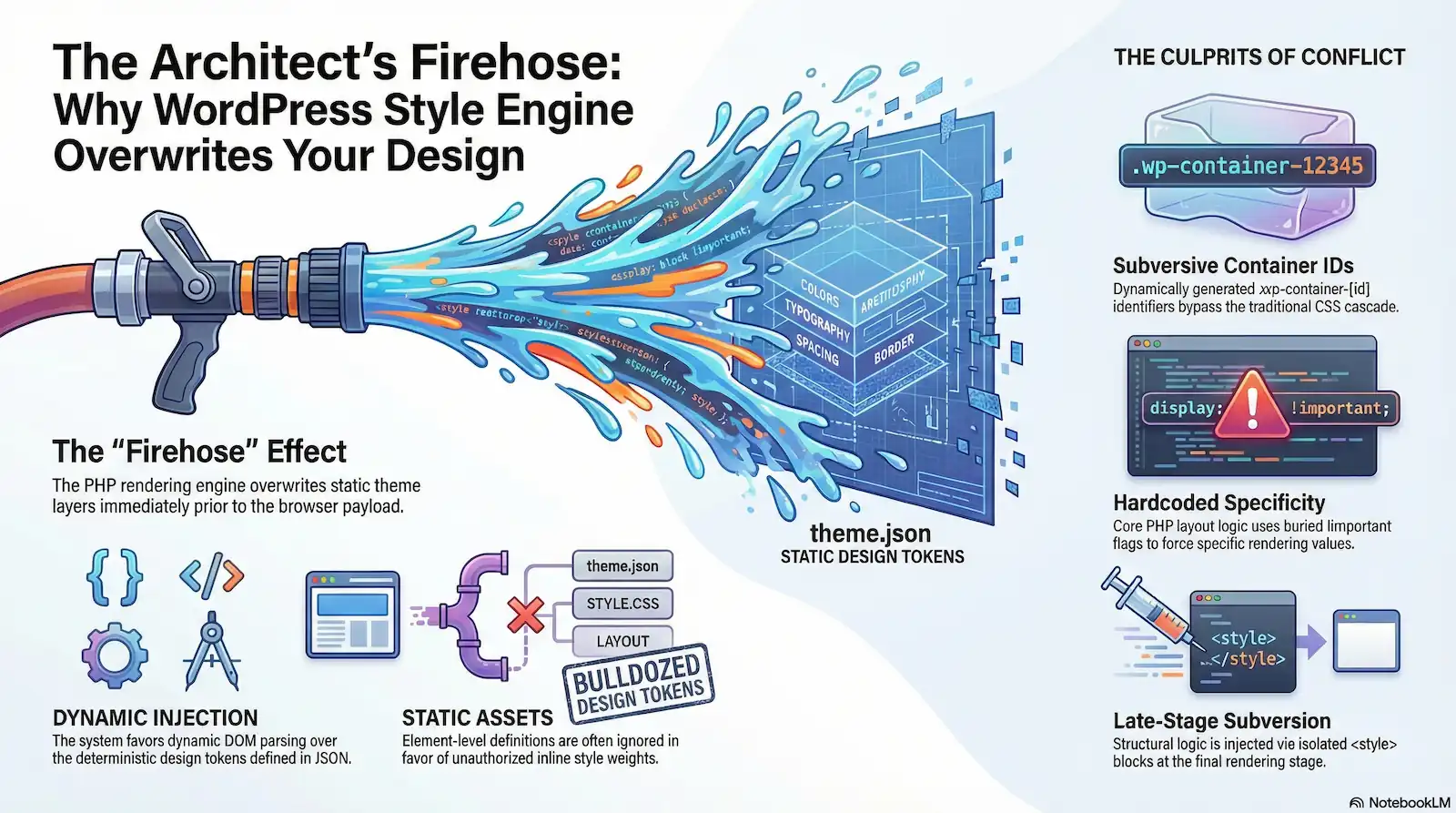
You configure theme.json to act as the canonical source of truth for your design tokens, only to load the frontend and watch your element-level definitions get bulldozed by inline styles. It is a common frustration for enterprise developers: you set a precise margin or a specific gap in your JSON schema, yet the browser stubbornly renders a different value, often backed by a specificity weight you didn’t authorize.
This friction is not the result of “bad CSS” or a misunderstanding of style hierarchies. Instead, it represents a fundamental mechanical failure in the WordPress rendering pipeline. While theme.json was marketed as a standardizing force for design tokens, the implementation of the WordPress Style Engine reveals a system that favors dynamic Document Object Model (DOM) parsing and late-stage inline injection over static, deterministic assets.
Working with this engine often feels like trying to paint a house while the architect is simultaneously spraying a firehose of new paint from the roof. No matter how carefully you apply your “static” theme layers, the architect’s high-pressure delivery system—the PHP rendering engine—overwrites your work immediately prior to the payload hitting the browser.
At the heart of this conflict are two mechanical culprits: dynamically generated .wp-container-[id] identifiers and hardcoded !important flags buried deep within the core PHP layout logic. These elements don’t just participate in the CSS cascade; they subvert it. By injecting structural logic via isolated <style> tags in the footer or head, WordPress ensures its opinionated layout rules—such as margin-block-start: 0!important—carry the mathematical specificity to neutralize your theme’s intent.
This guide provides a forensic audit of the Gutenberg layout engine. We will expose the exact execution branches in the rendering pipeline that transform your theme.json “truth” into a mere suggestion, and document the systemic instability that forces even the most disciplined performance engineers into a reactive posture of specificity hacks and overrides.
The Specificity Illusion: Why Core Always Wins
Your theme.json file is a meticulous architectural blueprint. You define the exact hex codes for your palette and the precise pixel values for your layout gaps. But as the page renders, the “Architect” (WordPress Core) arrives at the construction site not with a brush, but with a firehose. By the time the browser parses the Document Object Model (DOM), your blueprint is a soggy mess, buried under a high-pressure layer of dynamic inline styles that the Core engine decided were “more important” at the last millisecond.
This is the Specificity Illusion. Developers are led to believe that theme.json is the “canonical source of truth,” yet the mechanical reality of the WordPress rendering pipeline tells a different story. In the hierarchy of the browser, your clean JSON declarations are consistently outranked by the heavy-handed math of the WordPress Style Engine.
The Specificity Hierarchy: theme.json vs. Core Engine
| Selector Origin | Average Specificity | Result |
|---|---|---|
| theme.json Element | 0,0,1 | Overridden by basic defaults |
| theme.json Class | 0,1,0 | Frequently “bulldozed” by layout IDs |
| Core .wp-container ID | 0,4,0 | Dominant layout authority |
| Core Inline Style (PHP) | 1,0,0,0 (+ !important) | Absolute, unchangeable authority |
The “Nuclear” Identifier: .wp-container-[id]
The first major breakdown occurs when WordPress processes layout features like flex, grid, or custom alignment. Instead of relying on the classes you’ve defined in your theme, the Style Engine generates dynamic .wp-container-[id] selectors.
These are not standard utility classes. They are “Nuclear” identifiers—highly specific, unique strings generated on the fly. While your theme.json might output a selector like .wp-block-group (a specificity score of 0,1,0), the layout engine often wraps these in complex pseudo-classes or combines them with dynamic IDs that push the specificity weight to 0,4,0 or higher. Because these IDs are generated dynamically, they are “untargetable” in a static stylesheet. You cannot preemptively override a selector that doesn’t exist until the PHP engine runs its late-stage rendering loop.
The “Crime Scene”: lib/block-supports/layout.php
If the dynamic identifiers are the high-pressure spray, then the hardcoded !important flags are the permanent industrial epoxy. A forensic audit of the WordPress core file lib/block-supports/layout.php reveals the mechanical source of this frustration.
In this file, the engine evaluates block attributes and determines how to handle spacing and alignment. For certain layout-critical values—particularly those related to blockGap and “constrained” content widths—WordPress doesn’t just suggest a style; it mandates it. The engine hardcodes !important flags directly into the PHP-generated inline styles.
This creates a mathematical dead end. Even if you use the most specific CSS selector possible in your theme, a property tagged with !important at the inline level (specificity 1,0,0,0) is impossible to override via standard theme.json properties. The Style Engine effectively bypasses the CSS cascade entirely, favoring its own internal logic over your design tokens.
Why CSS Layers Can’t Save You
Modern frontend engineers often look to CSS Cascade Layers (@layer) as a solution to specificity wars. In theory, you could wrap your theme styles in a “high-priority” layer. However, the WordPress injection method renders this strategy toothless.
Because the Core Layout CSS is injected as inline styles or late-stage <style> blocks tied to dynamic IDs, it exists outside the traditional managed layer hierarchy. Inline styles naturally sit above all CSS layers in the cascade. By injecting these styles at the last possible moment in the PHP execution flow, WordPress ensures that the “Architect’s firehose” always has the final word, regardless of how organized your local @layer architecture may be.
This mechanical failure forces developers into a reactive posture. Instead of building a cohesive design system, performance engineers find themselves writing “counter-hacks” and filter-based overrides just to reclaim control over basic margins and padding—a direct contradiction of the “low-code” promise of theme.json.
The Layout Constraint: Hardcoded Injections and !important
If theme.json is the architectural blueprint for a WordPress site, the core PHP rendering pipeline is the architect who arrives on-site and decides to ignore the drawings entirely. While you might spend hours fine-tuning margins and block gaps within a JSON schema, a forensic audit of the WordPress backend reveals why these efforts often fail: the engine isn’t just suggesting layout rules; it is hardcoding them into the DOM using high-pressure PHP injections that bypass the CSS cascade entirely.
The “Crime Scene”: wp-includes/block-supports/layout.php
The mechanical origin of this conflict is not found in a stylesheet, but within the specific logic of wp-includes/block-supports/layout.php (or its Gutenberg plugin equivalent, lib/block-supports/layout.php). This file acts as the primary “firehose” for the WordPress Style Engine. Instead of generating clean, overridable utility classes, this script evaluates block attributes and dynamically assembles CSS strings that are echoed directly into the document head via the core-block-supports-inline-css style tag.
The failure point is architectural. Within this PHP file, WordPress employs opinionated structural rules that are often mathematically impossible to counteract. For instance, when a block is set to “constrained” or has specific alignment properties, the engine uses ternary operators to force margin values. You will find logic similar to:
$margin_left = $is_aligned_left ? '0!important' : 'auto!important';
By the time this logic reaches the frontend, it manifests as a nuclear strike against your theme’s design tokens. The resulting injection typically looks like this:
.is-layout-constrained > :where(:not(.alignleft):not(.alignright):not(.alignfull)) { margin-left: auto!important; margin-right: auto!important; }
Note the use of the :where pseudo-selector. While :where is designed to have zero specificity, the inclusion of the !important flag within the declaration block renders the specificity score irrelevant. It creates an inescapable requirement for compliance: the browser must prioritize the “auto” or “0” value because it is an inline-style-equivalent forced by the PHP engine.
Why are my theme.json margin settings being ignored?
The Technical Answer: Your theme.json settings are being “bulldozed” because WordPress Core treats layout as a functional requirement rather than a stylistic choice. In layout.php, the engine prioritizes layout integrity (ensuring a block doesn’t break its container) over developer intent. By hardcoding !important into the PHP-generated inline styles, the Style Engine ensures its structural opinions win every specificity war, regardless of what you define in your JSON configuration.
Flex Block Failures and the Missing API
The “Architect with the Firehose” analogy is most apparent when dealing with flex layouts (is-layout-flex). For many developers, the expectation is that theme.json provides a complete API for block design. However, the mechanical reality is that the theme.json schema lacks keys for critical flex properties, while the PHP engine simultaneously injects its own defaults.
When a Group or Columns block is set to a flex layout, the engine automatically injects a forced align-items: center and a default gap: 0.5em. Because these properties are often not exposed through the theme.json layout object, developers cannot even attempt to “set” a different value at the schema level to override the default. You are left with a layout that is visually dictated by core PHP logic rather than your design system.
This forces a “validated investigation” for the developer. If you have ever found yourself adding !important to your own theme stylesheets just to move a block five pixels to the left, your code isn’t broken—the engine’s delivery system is.
The Specificity Arms Race: Violating Best Practices
This mechanical failure forces enterprise developers into an “arms race” of specificity. When WordPress Core uses !important within an inline-injected style tag, it leaves the developer with only two choices:
- Use a more specific selector combined with a counter-
!importantflag. - Use a PHP filter to intercept and “clean” the style engine’s output before it hits the DOM.
Both options violate W3C and MDN best practices regarding the avoidance of !important. By relying on these “hardcoded pressure” tactics, WordPress undermines the very goal of theme.json: to provide a predictable, standardized, and low-specificity way to style the web. Instead of a collaborative system where the theme provides the “truth” and the core provides the “framework,” we are left with a conflict where the framework actively suppresses the truth to maintain its own opinionated structural rules.
Why Modern CSS @layer and Resets Fail Against Gutenberg
For the modern frontend architect, CSS Cascade Layers (@layer) represent the ultimate waterproofing for a design system. They offer a way to organize styles into a predictable hierarchy, ensuring that base resets never accidentally override component-level logic. However, in the WordPress ecosystem, this architectural protection is rendered useless by the “Unlayered Firehose” of the Style Engine.
While you are trying to organize your house’s paint layers through a controlled application process, the WordPress Core “Architect” is spraying unlayered, high-pressure inline styles directly onto the finished surfaces from the roof. Because these styles are injected outside of your defined layers, they bypass your organizational logic entirely.
The Specification Conflict: Layers vs. the Unlayered
The fundamental failure is not a bug in your code, but a strict adherence to W3C Cascade specifications. According to the CSS Cascading and Inheritance Level 5 spec, unlayered styles—those not wrapped in a @layer block—always take precedence over layered styles of the same origin.
When the WordPress Style Engine generates layout rules, it injects them as unlayered inline <style> tags or appends them directly to the DOM via the core-block-supports-inline-css handle. Because these injections lack a layer assignment, they reside in the “implicit outer layer.” Per W3C logic, even if you place your theme styles in a “Priority” layer, the unlayered core-injected styles will statistically and mechanically win every conflict, regardless of their specific selector weight.
The Hierarchy of Failure: Why Cascade Layers Lose
The inability to contain Gutenberg’s styles within a managed architecture stems from three mechanical realities:
- Cascade Precedence: Unlayered inline styles take precedence over layered styles from the same source (the theme/author).
- Rendering Sequence: The WordPress engine often injects its inline CSS blocks late in the rendering sequence, typically after the main theme stylesheet has been parsed, giving them “last-in” priority.
- DOM Proximity: Because many core styles are tied to dynamic identifiers (e.g.,
.wp-container-id), they are structurally tied to the specific DOM node, making them “impenetrable” to external layered resets.
The WordPress 6.3 Reset Regression
The conflict reaches a breaking point when developers attempt to use standard Global CSS Resets (e.g., p { margin: 0; }). Since the WordPress 6.3 update, a significant regression in the rendering order has surfaced. Standard resets, which are often unlayered for maximum reach, now frequently gain accidental precedence over the core-injected block gaps.
This occurs because the engine’s altered rendering order may place the user’s reset after the core block-support definitions in the document head. When a global reset targeting a simple element (specificity 0,0,1) appears after a core-injected gap declaration, the layout spacing simply vanishes. The developer is then forced into an “arms race”—either adding !important to their own design tokens or manually calculating complex overrides to account for the engine’s rendering sequence failures.
The Inline Injection Matrix
The mechanical reality is that dynamic IDs cannot be accurately referenced or contained within static CSS files. Because the .wp-container-[id] selectors carry a specificity weight of 0,2,0 to 0,4,0 and are generated on-the-fly, they remain outside the reach of your @layer boundaries.
You cannot pre-layer a selector that does not exist until the PHP engine generates it. This “Injection Matrix” ensures that the core layout engine remains the dominant authority. For the enterprise developer, this means that modern CSS features designed to solve specificity wars are effectively neutralized by a backend architecture that still treats the frontend as a dumping ground for late-stage inline CSS.
Headless, AJAX, and Custom Block Collapses
In a decoupled or highly dynamic environment, the WordPress Style Engine reveals its greatest architectural flaw: it is tethered to a server-side lifecycle that the modern frontend has outgrown. When you move away from standard theme templates, you encounter the “Ghost in the Machine.” The HTML (the body) arrives at the browser via the API or an AJAX handler, but the Style Engine (the soul) remains trapped on the server. The result is a phantom block—perfectly structured in the DOM with its .wp-container-id classes, but completely lifeless and unstyled.
The get_the_content() Trap
The most common point of failure for enterprise developers occurs within custom loops or AJAX endpoints. When you call get_the_content() or manually run apply_filters('the_content', $content), you expect the full block payload. However, these functions do not inherently trigger the style registration logic required by the Gutenberg engine.
Specifically, the wp_enqueue_stored_styles logic—the mechanism responsible for collecting and outputting the inline CSS for layout, colors, and typography—is often hooked into actions that only fire during a standard template load. If your AJAX handler returns a raw HTML string from a custom query, the Style Engine never “sees” the blocks inside that string. The HTML is delivered, but the corresponding CSS rules for those specific .wp-container identifiers are never enqueued, leaving the blocks in their raw, unstyled state.
The REST/GraphQL Void: Serialization Failure
In a headless architecture, the decoupling of the HTML payload from the Style Engine’s CSS payload becomes an impenetrable wall. The WordPress Style Engine is not built for data serialization; it is built for PHP rendering.
When blocks are consumed via the REST API or WPGraphQL, the dynamic CSS generated for flex layouts, grid gaps, and specific block-level overrides is missing from the response. Because these styles are generated on-the-fly based on the block’s internal attributes, they don’t exist in a static stylesheet. Unless you manually implement a “style serialization” layer to extract these definitions from the Style Engine and include them in your JSON response, your headless frontend has no way of knowing what a .wp-container-6 class is supposed to look like.
The Footer Disconnect and DOM Fragments
Even when developers successfully trigger the Style Engine in an AJAX context, they often run into the Footer Disconnect. By design, WordPress frequently late-enqueues layout-specific CSS in the wp_footer to optimize the rendering path.
When an AJAX request replaces a portion of the DOM—a common pattern in infinite scroll or filtered archives—it only swaps out the HTML fragment. The browser does not re-run the wp_footer logic. If the new blocks injected into the page require fresh .wp-container definitions that weren’t present on the initial page load, those styles simply don’t exist in the browser’s CSSOM. You are essentially asking the browser to render a blueprint it hasn’t been given, resulting in “layout collapse” where flex containers lose their alignment and gaps revert to zero.
Troubleshooting Checklist: Missing Block Styles
If your blocks are appearing unstyled in a custom or headless environment, verify the following:
- Identifier Match: Does the
.wp-container-[id]in the HTML have a matching declaration in the<style id="core-block-supports-inline-css">tag? - Lifecycle Execution: Are you calling
_wp_render_layout_support_flag()or ensuring therender_blockfilters are fully executed during your AJAX/API callback? - Style Serialization: If using Headless, have you verified that your API provider (REST/GraphQL) is actually capturing and delivering the
cssattribute from the block supports? - Payload Completeness: Is your AJAX response returning just the HTML fragment, or is it also delivering the necessary
<style>tags required to support that fragment?
An Audit of Version Regressions (WP 6.1 to 6.6)
In previous sections, we established that the WordPress Style Engine acts as an “Architect with a Firehose,” overriding developer intent with high-pressure inline injections. However, for the enterprise maintainer, the challenge is not just the pressure—it is the fact that the Architect is constantly changing the nozzle.
Since the release of WordPress 6.1, every major update has fundamentally altered the “spray pattern” of the CSS output logic. These are not merely iterative improvements; they are mechanical shifts in the rendering pipeline that render previous theme.json “waterproofing”—the custom workarounds and filters developers use to maintain design integrity—obsolete. This forensic audit tracks the history of these regressions, documenting how the pursuit of “layout flexibility” in Core has created a cycle of architectural instability.
The Regression Registry: WP 6.1 – 6.6
| Version | Affected Property | Mechanical Cause | Developer Impact |
|---|---|---|---|
| 6.1 | Layout Structure | Refactor of block-support layout logic to dynamic IDs. | Loss of predictable class targeting; start of “Dynamic ID” era. |
| 6.2 | Flex Layouts / Gap | Hardcoded margins in layout.php (Issue #49502). | Broken custom block spacing; blockGap settings ignored. |
| 6.3 | Block Gap / Margins | Intentional specificity increase for layout rules (Issue #53717). | Mass override of theme-level margins; hundreds of themes “broken.” |
| 6.5 | Container Widths | New alignment logic for wide blocks in groups (Issue #60413). | Unintended constraints on wide/full blocks; design breakage. |
| 6.6 | Global Elements | Escalated specificity for typography and elements. | Developer CSS buried deeper; “arms race” of specificity continues. |
Case File WP 6.1: The Structural Refactor
The transition began in earnest with the WordPress 6.1 layout support refactor. This update laid the groundwork for the current specificity crisis by moving away from predictable structural classes (like .wp-block-group) toward the dynamic container ID system. The core team’s goal was to provide more granular control over individual block layouts, but the mechanical result was the introduction of the .wp-container-[hash] selector. This change effectively “blinded” developers; you could no longer write a static CSS rule to target a block’s layout because the identifier was now a moving target generated at runtime.
Case File WP 6.2: The Flex Failure (Issue #49502)
With WordPress 6.2, the “Architect” began applying significant pressure to flex layouts. A critical regression surfaced in the way blockGap was calculated for custom blocks and standard columns. By forcing layout-specific margins directly into the inline style output, the engine began ignoring theme.json spacing scales for any block utilizing the flex layout type. As documented in GitHub Issue #49502, this was not a styling choice but a mechanical failure in how PHP-side layout attributes were mapped to CSS properties, forcing developers to manually “reset” margins that the engine should never have injected in the first place.
Case File WP 6.3: The Specificity Bump (Issue #53717)
WordPress 6.3 introduced what is now known as the “Specificity Bump.” In an attempt to ensure core layout rules weren’t overridden by overly aggressive theme resets, the core engine intentionally elevated the mathematical weight of blockGap and margin declarations. Specifically, selectors that previously carried a weight of 0,0,1 (element) were escalated to 0,1,0 (class) or higher through the addition of layout-specific pseudo-classes. As noted in GitHub Issue #53717, this “fix” for one problem effectively “bulldozed” the design tokens in hundreds of existing block themes that relied on standard CSS overrides. The Architect didn’t just change the nozzle; they increased the PSI of the firehose until the existing walls crumbled.
Case File WP 6.5: The Container Constraint (Issue #60413)
The release of WordPress 6.5 introduced a new frontend CSS output logic that fundamentally changed how “Wide” and “Full” blocks behaved within Group containers. Prior to this, a wide block would respect its container’s theme.json constraints. After 6.5, a refactor in the alignment logic (GitHub Issue #60413) caused blocks inside groups to be suddenly constrained by new, hardcoded PHP calculations. This regression meant that designs that previously worked perfectly were now “boxed in” by hidden constraints, requiring developers to perform a forensic search through the Style Engine’s inline output to find the new mechanical culprit.
Case File WP 6.6: The Global Style Overpower
The most recent entry in our audit is WordPress 6.6. In a well-intentioned effort to “clean up” specificity issues, the core team implemented a massive “Specificity Bump” for global typography and element styles. The logic was to make global styles “stronger” than core block defaults. However, for the enterprise developer, this simply moved the goalposts further away. By elevating the base specificity of the entire theme.json output, WordPress has inadvertently buried developer-level CSS—the custom styles you write in your theme’s style.css—even deeper under the core-generated layers. It is a “Global Override” that forces themes into an even more intense specificity arms race just to change a font size or a link color.
The Architectural Risk of Unpredictability
This timeline demonstrates that the WordPress Style Engine is not a stable platform for enterprise development. When the core rendering logic can—and does—change its specificity math or its injection pattern with every major release, the “Total Cost of Ownership” for a WordPress site skyrockets.
Enterprise developers are no longer just building design systems; they are playing a perpetual game of cat-and-mouse with the core PHP pipeline. Every update requires a full forensic re-audit of the frontend to ensure the “Architect” hasn’t once again changed the nozzle and sprayed over the theme’s design tokens. This unpredictability is the ultimate architectural risk, turning theme.json from a source of truth into a liability that must be constantly defended against its own engine.
How to Force Style Overrides (The Tactical Fixes)
Identifying the “Architect with the Firehose” is only the first step of a forensic audit. For the enterprise engineer, the goal is remediation. If the WordPress Style Engine insists on spraying unlayered, high-pressure inline styles across your DOM, you must install Control Valves. These are programmatic interventions designed to intercept, redirect, or completely shut off the engine’s output before it compromises your frontend performance and design integrity.
The following tactics represent the professional standard for reclaiming control. We are moving beyond the “Additional CSS” box and into the mechanics of the rendering pipeline.
Tactic 1: The render_block Filter (The Nuclear Option)
When the Style Engine injects a hardcoded !important flag that defies all other logic, you must move to the end of the PHP pipeline. The render_block hook allows you to intercept the final HTML string of a block before it is echoed to the buffer.
This is the “Nuclear Option” because it physically strips the “paint” off the walls. Use this to remove the .wp-container-id classes or the style attributes that contain the hardcoded layout logic found in layout.php.
Implementation:
- Identify the target block (e.g.,
core/group). - Use a regex or
DOMDocumentto locate thestyleattribute. - Strip the offending properties.
/**
 * Forcefully strip core-injected inline styles from Group blocks.
 */
add_filter( 'render_block', function( $block_content, $block ) {
    if ( 'core/group' === $block['blockName'] ) {
        // Remove the style attribute entirely or target specific !important strings
        $block_content = preg_replace( '/style="[^"]*margin[^"]*"/', '', $block_content );

        // Optionally remove the dynamic container class to stop the CSS collision
        $block_content = preg_replace( '/wp-container-\d+/', '', $block_content );
    }
    return $block_content;
}, 10, 2 );
Pros: Absolute control; effectively kills the firehose for specific blocks.
Cons: High performance overhead if used globally; regex can be fragile if core updates the HTML structure.
Tactic 2: Filtering the theme.json Object
Before the Style Engine ever generates a line of CSS, it assembles a massive data object. You can intercept this process using the wp_theme_json_data_theme filter. This allows you to programmatically inject “Theme” level definitions that sit higher in the engine’s internal processing order than the “Core” defaults.
By manipulating the object here, you can force the engine to use your design tokens as the basis for its calculations, potentially preventing the need for late-stage overrides.
Implementation:
- Hook into
wp_theme_json_data_theme. - Navigate the nested array to the specific block and setting.
- Inject your value, effectively “shimming” the engine.
/**
 * Programmatically override core layout defaults in the theme.json object.
 */
add_filter( 'wp_theme_json_data_theme', function( $theme_json ) {
    $data = $theme_json->get_data();

    // Force a specific blockGap value for all flex layouts to bypass layout.php defaults
    $data['settings']['layout']['blockGap'] = '1.5rem';

    // Update the object and return
    return $theme_json->update_with( $data );
});
Pros: cleaner than DOM manipulation; stays within the “official” Style Engine workflow.
Cons: Requires deep knowledge of the complex nested array structure of the theme_json object.
Tactic 3: Opting Out of Layout (The Prevention Valve)
The most efficient way to handle the firehose is to shut it off at the source. The Style Engine only injects high-pressure layout CSS when specific features are enabled in theme.json. By opting out of the “opinionated” layout system, you prevent layout.php from generating the .is-layout-constrained classes and the associated !important margins.
Implementation:
- Open your
theme.json. - Set
contentSizeandwideSizetonull. - Disable
appearanceToolsif you prefer to manage borders and spacing via your own CSS system.
{
  "settings": {
    "layout": {
      "contentSize": null,
      "wideSize": null,
      "allowEditing": false
    },
    "spacing": {
      "blockGap": null
    }
  }
}
By setting these to null, you remove the variables the PHP engine uses to calculate those hardcoded overrides. The Architect still has the firehose, but there is no water in the tank.
Pros: Zero performance impact; eliminates the source of the most common layout regressions.
Cons: Disables the alignment UI in the editor, which may frustrate non-technical users.
Tactic 4: The Specificity Bridge
If you cannot disable the core engine, you must fight fire with fire. The theme.json schema supports a css property within individual block settings. This property allows you to write raw CSS that is enqueued specifically for that block type. Because this CSS is often output in a later style tag or with a more specific block-level selector, it can act as a “Specificity Bridge” to cross over the core injections.
Implementation:
- In
theme.json, navigate tostyles.blocks.[blockname]. - Use the
csskey to write a selector that targets the block specifically. - Use the
&nesting selector to ensure your rule is tied to the block’s current instance.
{
  "styles": {
    "blocks": {
      "core/columns": {
        "css": "padding: 0 !important; & .wp-block-column { margin-top: 0 !important; }"
      }
    }
  }
}
This method is superior to a global stylesheet because the engine handles the enqueuing logic, ensuring the styles are present even in AJAX fragments, while the use of & helps bridge the gap between your static intent and the dynamic IDs generated by the engine.
Architect’s Recommendation: Selecting Your Valve
Navigating these fixes requires a triage-based approach. The “Control Valve” you select depends on the severity of the collision:
- For Global System Stability: Use Tactic 3 (Opting Out). If you are building an enterprise site where design precision is paramount, do not let WordPress calculate your container widths. Manage them in your base CSS layer.
- For Dynamic or Headless Contexts: Use Tactic 2 (theme.json Data Filter). Ensuring the style engine’s “brain” has the correct data from the start is the most reliable way to maintain consistency across REST/GraphQL payloads.
- For “Broken” Core Blocks: Use Tactic 4 (Specificity Bridge). When a single block (like Columns or Buttons) is behaving erratically due to core regressions, use the block-level
cssproperty to force compliance. - For Emergency Remediation: Use Tactic 1 (The Nuclear Filter). When a WordPress core update (like the 6.3 or 6.6 specificity bumps) introduces a regression that you cannot fix via JSON, use the PHP filter to intercept and clean the output.
By implementing these valves, you transform the Style Engine from a source of architectural risk into a manageable—if still opinionated—delivery system.
Synthesis: The Future of the WordPress Style Engine
The architectural instability documented in this audit is the mechanical byproduct of a fundamental identity crisis. WordPress is attempting to function simultaneously as a “Zero-Code” site builder for the mass market and a “Developer-First” platform for the enterprise. The current specificity war—the “Firehose” of late-stage inline injections—is the result of trying to guarantee a visual result for users without a standardized, cascading contract with developers.
The 6.6 Escalation: An Arms Race, Not a Solution
The recent changes in WordPress 6.6, characterized by a global specificity bump, represent an escalation rather than a resolution of this tension. By raising the “specificity floor” for global styles, Core has attempted to prevent accidental overrides from low-authority CSS. However, this move lacks Surgical Precision. Instead of fixing the engine’s delivery mechanism, it simply increased the pressure of the firehose. For the enterprise engineer, this means that applying a simple override now requires even higher mathematical weight, further entrenching the “arms race” that violates modern frontend best practices.
From the Firehose to Irrigation: The Layered Path Forward
The only viable exit strategy for the WordPress Style Engine is a transition from the chaotic firehose model to a standardized Irrigation System built on CSS Cascade Layers (@layer).
Native support for @layer within the WordPress rendering pipeline would allow Core, Theme, and User styles to reside in distinct, non-conflicting buckets. In this future, the “Architect” wouldn’t spray paint from the roof; they would deposit it into the appropriate “Core” layer at the base of the irrigation system. This would allow a developer’s theme.json declarations—and their custom stylesheets—to exist in a higher-priority layer that mechanically supersedes core defaults without the need for dynamic IDs or !important flags. This shift would replace Architectural Debt with Schema Standardization, ensuring that the “blueprint” is finally respected by the engine.
The Enterprise Verdict: Tactical Guardrails Required
For CTOs and Lead Developers, the conclusion of this Forensic Audit is clear: theme.json is a powerful but flawed API. It offers an unprecedented opportunity for design token standardization, yet its mechanical execution remains unreliable for high-end, custom-engineered designs.
Until WordPress natively adopts Cascade Layers and decouples the Style Engine from late-stage PHP injections, enterprise projects cannot rely on theme.json as a standalone “source of truth.” It requires Tactical Guardrails—the specific render_block filters and schema opt-outs detailed in this guide—to remain production-ready. We acknowledge the frustration of the developer stuck in the specificity trenches; you are not fighting your own code, but an engine struggling to reconcile its dual identities.