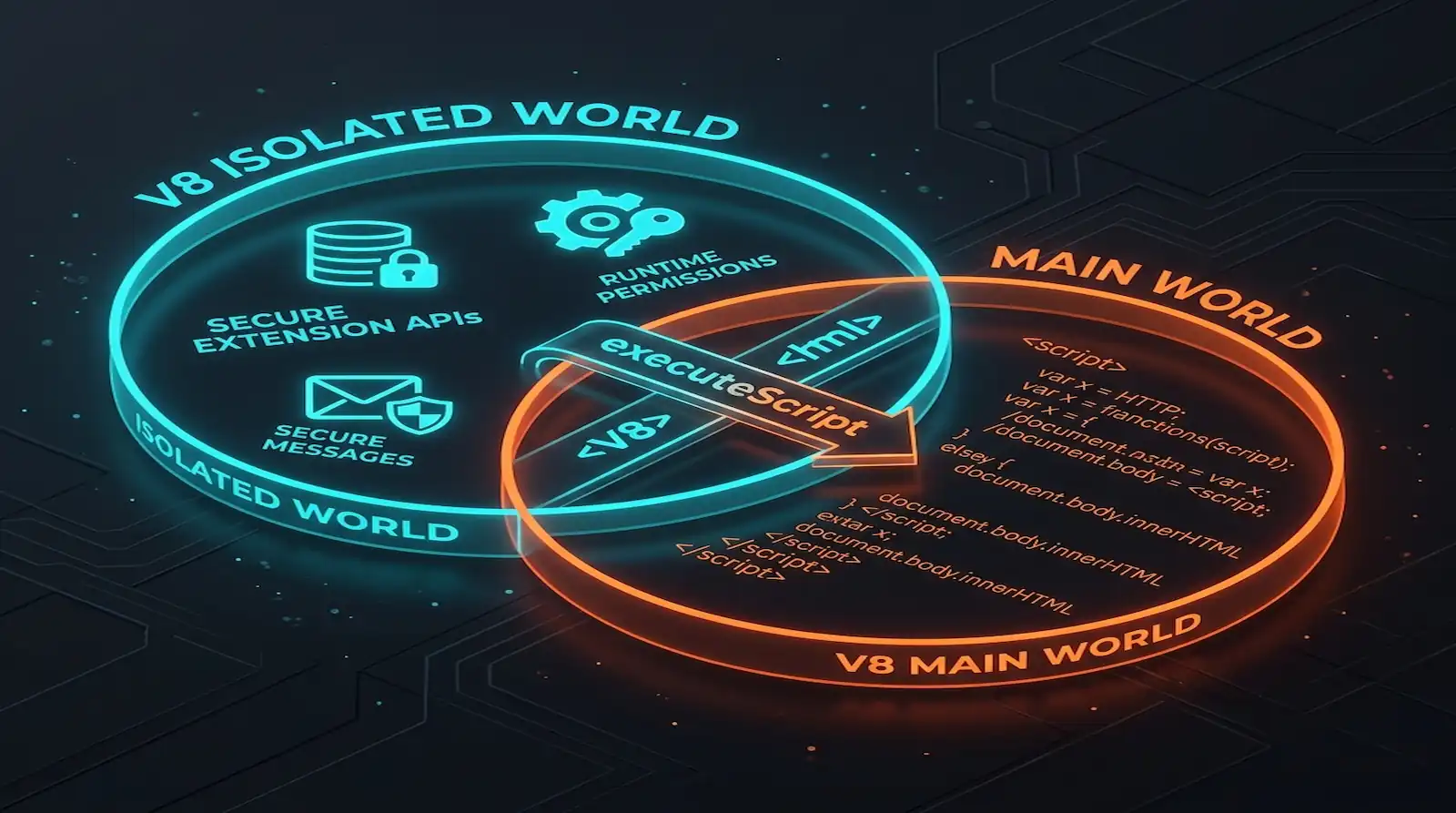
In mid-2026, Google completed its Manifest V2 deprecation. This change leaves the ecosystem under Manifest V3 rules. Notably, 2026 data shows that 73.4% of extensions migrated successfully. However, others were removed from the Web Store (AboutChromebooks, 2025). By default, Chrome runs content scripts in an isolated world. This protects extensions. Yet, it isolates them from the page’s active JavaScript context. For example, Web3 wallets and developer tools find this sandbox to be a major barrier.
Therefore, this tutorial shows when to escape the isolated world. We use chrome.scripting.executeScript in the MAIN context. Additionally, we show you how to build a secure, hybrid execution-segregated architecture.
- MV3 content scripts default to the
ISOLATEDworld, but Web3 dApps require theMAINcontext to inject APIs (w3c/webextensions, 2025). - Injected scripts in the
MAINworld share V8 prototype chains with the page, risking global prototype pollution. - Partitioning logic into an Isolated Core and a Main World Shim solves timing and security issues.
- A CustomEvent bridge secured by a random UUID secret maintains communication without public interception.
What Is the Isolated World vs. MAIN Context in Chrome Extensions?
In 2026, Chrome holds a 65% global browser market share (Statcounter, 2026). This share dictates how extension environments operate. By default, Chrome runs content scripts in the ISOLATED world. This provides a private V8 context. It shares the DOM but separates JavaScript variables. Consequently, the MAIN context merges execution with page-native scripts.
Specifically, the Isolated World is a private JavaScript environment. It is unique to your content scripts. When your script runs here, it cannot read webpage variables. For example, if a page runs React, your script cannot access window.ReduxStore. This separation prevents website scripts from sniffing extension data. However, both environments share the same DOM. Thus, you can read page text or modify HTML elements from either context.
Conversely, the MAIN context is the shared JavaScript environment. This is where page scripts execute. Any script here has full access to the page’s context. Therefore, you can modify global objects directly. However, you lose access to extension APIs like chrome.runtime and chrome.storage.
The table below summarizes these environmental differences:
| Feature / Metric | MAIN World (world: ‘MAIN’) | ISOLATED World (world: ‘ISOLATED’) |
|---|---|---|
| JS Environment | Shared V8 context with webpage | Private/Separate V8 context |
| Access Page Variables | Yes (direct window object access) | No (isolated window object) |
| Extension APIs | None (no chrome.runtime access) | Yes (full content script API access) |
| CSP Scope | Bound by host page’s active CSP | Separate, extension-specific CSP |
| DOM Access | Full access to DOM tree | Full access to DOM tree |
| Security Risk | High (vulnerable to page scripts) | Low (isolated from page scripts) |
Why Does executeScript Need the MAIN World Context?
In Q1 2026, MetaMask reported over 30 million active users (ConsenSys, 2026). These users rely on extension-injected wallet APIs. Therefore, Web3 extensions must run in the MAIN context. Injecting window.ethereum is only possible within the page’s active environment. Notably, the default isolated world blocks this access.
Without escaping, Web3 apps cannot discover the injected provider. The same rule applies to dev tools that hook page functions. For instance, profilers must override performance.mark. Similarly, debugging helpers need to proxy console.log. In the isolated world, these modifications apply only to the extension’s context. Consequently, the page’s context remains unchanged.
Furthermore, scripts in the main context access the V8 garbage collector. They also share the standard event loop timings. In our experience, this makes the main context essential for performance tools. Specifically, these tools must measure exact paint timings and main-thread blocks.
According to a 2025 W3C WebExtensions group proposal, executing content scripts in the MAIN context is the only standardized way extensions can expose API providers to host pages. This avoids unsafe DOM-injection hacks (w3c/webextensions, 2025). This API standardizes access to page-native V8 contexts.
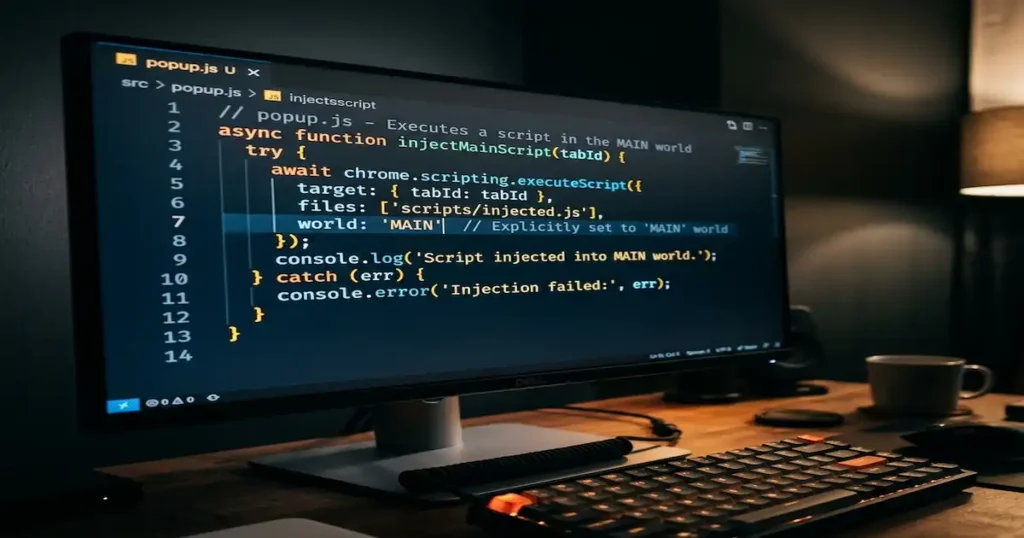
How Do Content Security Policies (CSP) Block Main World Injections?
In 2025, security reports documented a record 48,185 CVE disclosures (NVD/CVE database, 2025). This pushed enterprises to enforce strict Content Security Policies. Scripts running in the MAIN context are bound by the page’s CSP. As a result, they face failures if the page blocks inline scripts or dynamic compilation.
When you inject a script into the main world, the browser evaluates it against the page’s CSP. Specifically, this introduces several severe breaking points:
- Dynamic Compilation Restrictions: If the page CSP omits
unsafe-eval, dynamic compilation fails. For example, callingeval()throws anEvalError. - Resource Loading Blocks: Loading local extension resources via the DOM is blocked. For instance, appending a script with a
chrome-extension://source fails unless the CSP allows the scheme. - Trusted Types Enforcement: If a page enforces Trusted Types, writing to DOM sinks is blocked. Specifically, writing to
Element.innerHTMLthrows an error unless handled via a policy. - Blink and Gecko Divergences: In Firefox, main world CSP checks face engine-specific limits. Under strict CSPs, Gecko may block inline elements, causing silent failures.
To visualize these execution delays and registration latencies across injection methods, consider the performance metrics:
Figure 1: Script execution start latency (ms) relative to the document_start phase in Chromium.
What Are the MV3 Timing Paradoxes and Lifecycle Failures?
In 2026, extension security audits show that vulnerability remediation times hit 54.81 days (Edgescan, 2025). Therefore, early lifecycle timing is crucial to secure APIs before pages run. Under Manifest V3, developers face timing paradoxes. Asynchronous script loading allows page-native scripts to run ahead of extensions.
Specifically, under Manifest V2, developers achieved synchronous execution. They injected inline script tags into the DOM at document_start. This legacy hack executed synchronously. It blocked the HTML parser. Consequently, this ensured that custom overrides ran before page scripts.
However, in Manifest V3, this mechanism is restricted. Appending a script tag pointing to a local file dynamically forces asynchronous execution, leaving a window for race conditions. To address this, developers should declare main-world content scripts natively in the manifest using "world": "MAIN", forcing synchronous browser injection at document_start and bypassing host page CSP policies. Declaring scripts natively under Manifest V3 avoids dynamic DOM-based injection hacks. However, developers must navigate specific execution failures:
1. The Tab Committed Navigation Failure (RenderFrameHost Swapping)
Calling chrome.scripting.executeScript right after chrome.tabs.create often fails. This is because the frame is undergoing transition (Chromium Bug 41375449, 2025). The tab creation completes before the URL commits. Thus, injecting at document_start clashes with navigation.
Consequently, if the navigation swaps the RenderFrameHost (RFH), the task fails. The browser attempts to inject into the tab. However, because that frame is destroyed, the API terminates with a ‘The tab was closed’ error.
2. Execution Scheduling Latency and Render Bottlenecks
Using chrome.scripting.registerContentScripts schedules execution at document_start. However, registration occurs asynchronously in the background service worker. This creates a race with the page load. Specifically, if the page renders before registration finishes, the script applies too late. Therefore, it executes on subsequent page loads only.
Additionally, at document_start, the script runs before DOM elements are built. Modifying page prototypes here forces the script to compete for CPU time. This frequently delays the initial page render.
3. Namespace Collision on Shared URLs (Chromium Bug 324096753)
A failure occurs when developers reuse files across main and isolated scripts matching the same URL (Chromium Bug 324096753, 2024). Under this bug, the browser mixes namespaces across these contexts. Therefore, if both worlds parse the same file, V8 throws a redeclaration error. This crashes script execution in both worlds.
The vulnerability matrix below details the security exposure of both environments:
Figure 2: Vulnerability and risk comparison index between Isolated and Main execution contexts.
Tutorial: How to Build a Secure execution-segregated Hybrid Architecture?
In 2026, developers increasingly adopt hybrid extension models to bridge contexts without compromising security. The standard solution is a partitioned model. Specifically, a Main World Shim intercepts calls at document_start. Meanwhile, an Isolated Core processes storage and background communication.
Here is how the components interact:
[ HOST PAGE WEB WINDOW ] (MAIN World)
│
├─── ► [ Minimalist Hook / Proxy Shim ] (Injected at document_start via API)
│        │
│        ▼ (Captures window.ethereum or proxy methods)
│
└─── ► Secure CustomEvent Bridge (Pre-shared random UUID secret event name)
         │
         ▼
[ EXTENSION CONTENT SCRIPT ] (ISOLATED World)
         │
         ├─── ► Verifies and sanitizes payload data
         │
         └─── ► Direct execution of chrome.runtime APIs & secure storage
We will build this hybrid system step-by-step.
Step 1: Initialize the Manifest V3 Extension
Create the base configuration file manifest.json. We register content-script.js in the ISOLATED world and shim.js natively in the MAIN world. Natively registering the main world script ensures that the browser injects it synchronously at document_start and completely bypasses host page CSP restrictions without requiring risky web_accessible_resources declarations.
{
  "manifest_version": 3,
  "name": "Secure Web3 Proxy Extension",
  "version": "1.0.0",
  "description": "Demonstrates a secure context-bridge using static MAIN injections.",
  "permissions": [
    "scripting",
    "activeTab"
  ],
  "host_permissions": [
    "https://*.example.com/*"
  ],
  "background": {
    "service_worker": "background.js"
  },
  "content_scripts": [
    {
      "matches": ["https://*.example.com/*"],
      "js": ["content-script.js"],
      "run_at": "document_start",
      "world": "ISOLATED"
    },
    {
      "matches": ["https://*.example.com/*"],
      "js": ["shim.js"],
      "run_at": "document_start",
      "world": "MAIN"
    }
  ]
}
Step 2: Implement the Main World Shim (Injected Interceptor)
In our experience, keeping the main-world script small is key. Since this script runs natively in the MAIN world at document_start before any page scripts execute, it generates a cryptographically secure random secret and sends it across the context boundary via a one-time initialization event. To prevent memory leaks, requests are guarded by a timeout that automatically cleans up pending event listeners under failure conditions.
// shim.js
(function () {
  // Generate a cryptographically secure random secret
  const bridgeSecret = crypto.randomUUID();

  // Hook window.ethereum proxy with a prototype-free, frozen interface
  const ethereumProvider = Object.create(null);
  ethereumProvider.request = async (args) => {
    return new Promise((resolve, reject) => {
      const requestId = Math.random().toString(36).slice(2, 9);

      // Set up a cleanup timeout to prevent memory leaks under failure conditions
      const timeoutId = setTimeout(() => {
        window.removeEventListener(`${bridgeSecret}-response`, responseHandler);
        reject(new Error("Extension request timed out"));
      }, 5000);

      // Listen for the specific response event
      const responseHandler = (event) => {
        if (event.detail.requestId === requestId) {
          clearTimeout(timeoutId);
          window.removeEventListener(`${bridgeSecret}-response`, responseHandler);
          if (event.detail.error) {
            reject(new Error(event.detail.error));
          } else {
            resolve(event.detail.result);
          }
        }
      };
      window.addEventListener(`${bridgeSecret}-response`, responseHandler);

      // Dispatch request across the bridge
      const requestEvent = new CustomEvent(`${bridgeSecret}-request`, {
        detail: { requestId, args }
      });
      window.dispatchEvent(requestEvent);
    });
  };
  Object.freeze(ethereumProvider);

  // Define the non-configurable property on window
  Object.defineProperty(window, "myExtensionAPI", {
    value: ethereumProvider,
    writable: false,
    configurable: false
  });

  // Synchronously dispatch the secret before any page scripts compile
  window.dispatchEvent(new CustomEvent("init-bridge", { detail: bridgeSecret }));

  console.log("Main World Shim injected and myExtensionAPI initialized.");
})();
Step 3: Implement the Isolated Core (Primary Engine)
The isolated core runs in the ISOLATED world. It synchronously registers a one-time listener for the "init-bridge" event to capture the pre-shared secret, avoiding any DOM manipulation or sniffing vulnerabilities, and handles messaging to the background worker.
// content-script.js
(() => {
  // Listen synchronously for the main-world initialization event
  window.addEventListener("init-bridge", (initEvent) => {
    const bridgeSecret = initEvent.detail;
    if (!bridgeSecret) return;

    // Listen for requests from the main world
    window.addEventListener(`${bridgeSecret}-request`, async (event) => {
      const { requestId, args } = event.detail;

      try {
        // Forward the request to the background script
        const result = await chrome.runtime.sendMessage({ type: "API_CALL", args });

        // Dispatch response back
        window.dispatchEvent(new CustomEvent(`${bridgeSecret}-response`, {
          detail: { requestId, result }
        }));
      } catch (err) {
        window.dispatchEvent(new CustomEvent(`${bridgeSecret}-response`, {
          detail: { requestId, error: err.message }
        }));
      }
    });

    console.log("Isolated Core bridge established.");
  }, { once: true });
})();
Step 4: Establish the Secure CustomEvent Bridge
For background execution, write background.js to process requests.
// background.js
chrome.runtime.onMessage.addListener((message, sender, sendResponse) => {
  if (message.type === "API_CALL") {
    // Perform privileged API calls or background network fetches
    // Using a mocked response for demonstration
    const { method } = message.args || {};

    if (method === "get_status") {
      sendResponse({ status: "connected", node: "mainnet-01" });
    } else {
      sendResponse({ error: "Unsupported method" });
    }
  }
  return true; // Keep message channel open for async response
});
How Do You Verify and Test the Setup?
In 2025, security advisories highlighted that a significant portion of extension vulnerabilities arose from unverified communication channels (GitHub Security Advisories, 2025). Verifying your hybrid architecture requires smoke testing the secure CustomEvent bridge and asserting that window overrides execute before page scripts.
Manual Verification Checklist
- Verify Early Injection: Load your extension in Developer Mode. Open
https://example.comand verify thatwindow.myExtensionAPIis defined immediately in the browser console. - Prototype Pollution Test: In the browser console, execute:Verify that your extension’s background actions are unaffected. The bridge communicates using randomized event names that cannot be intercepted by modifying prototype methods.
Object.prototype.polluted = "attack";console.log(({}).polluted); // "attack" - Validate Event Sniffing Block: Attempt to listen for messages by running:Verify that no extension transaction data is logged. Since we use
CustomEventwith a dynamic UUID secret instead ofwindow.postMessage, page scripts cannot sniff the payload without guessing the secret.window.addEventListener("message", (e) => console.log(e.data));
For a complete video walkthrough showing how to build and test these contexts, watch this tutorial:
Troubleshooting Common Context Boundary Issues
In 2025, surveys showed that developers spent significant debugging time resolving context mismatch and execution errors in browser extensions (Stack Overflow Developer Survey, 2025). Troubleshooting requires understanding specific error signatures, such as the tabs.executeScript RenderFrameHost swap failure or V8 redeclaration conflicts.
| Problem | Cause | Fix |
|---|---|---|
EvalError: Refused to evaluate... | Host page CSP lacks 'unsafe-eval' directive. | Avoid using eval() or new Function() inside shim.js. Pass pre-parsed JSON instead. |
Error: The tab was closed | Injected script executed before tab navigation committed (RFH swapped). | Listen for chrome.webNavigation.onCommitted before executing scripts. |
SyntaxError: Identifier 'X' has already been declared | Same utility file registered in both MAIN and ISOLATED worlds (Chromium Bug 324096753). | Use separate files for separate worlds. Do not bundle shared libraries. |
| Injection runs too late | Script injected asynchronously via <script src="...">. | Set run_at: "document_start" in manifest or use chrome.userScripts API in MV3. |
chrome.runtime is undefined | Attempting to access extension APIs directly from the MAIN world context. | Route requests through the CustomEvent bridge to the ISOLATED content script. |
FAQs
world: 'MAIN' are completely isolated from extension APIs to protect user privacy (chrome.com, 2026). You must route storage requests through a secure CustomEvent bridge, communicating directly with your ISOLATED world content script to write or read stored key-value pairs. chrome.scripting.executeScript runs scripts dynamically at runtime, whereas content scripts are declared statically in the manifest or registered programmatically to run automatically on matching page URL patterns. Dynamic execution via executeScript is prone to RFH navigation clashes and “The tab was closed” errors if fired too early (Chromium Bug 41375449, 2025). shim.js. Always initialize configuration maps with a null prototype using Object.create(null) instead of standard literals. This blocks page-native scripts from injecting hooks into Object.prototype (groups.google.com, 2025).